YellowDot icon
YellowDot icon

YellowDot

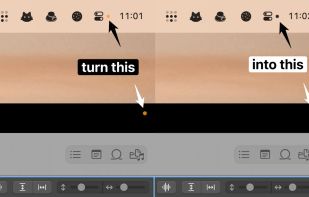
Hide the macOS yellow recording dot.

YellowDot screenshot 1

Cost / License

Platforms

  • Mac
0likes
0comments
0alternatives
0articles

Features

No features, maybe you want to suggest one?

YellowDot News & Activities

Highlights All activities

Recent activities

No activities found.

YellowDot information

  • Developed by

    RO flagThe low-tech guys
  • Licensing

    Open Source (GPL-3.0) and Free product.
  • Written in

  • Alternatives

    0 alternatives listed
  • Supported Languages

    • English

GitHub repository

  •  199 Stars
  •  16 Forks
  •  4 Open Issues
  •   Updated  
View on GitHub
YellowDot was added to AlternativeTo by Paul on and this page was last updated .
No comments or reviews, maybe you want to be first?

What is YellowDot?

Hide that pesky yellow dot

As long as the YellowDot app is running, the corner dot will always blend in with the current menubar icon colors instead of being a colorful distraction.

The menubar icon settings allows you to color the dot in black or white. The menubar icon can also be hidden for a cleaner look.

How it works?

YellowDot works by searching for the dot on the screen, and then making it full black or white to make it blend in with the menubar icon colors. This action is done every second to keep the dot hidden at all times. In fullscreen spaces on MacBooks with a notch, this makes the dot disappear completely.

But why?

The yellow dot is useful in letting you know if an app is using the microphone without your permission, or if you forgot an app open that's still recording. But when you're already familiar with all the apps that use the microphone, it turns into an annoyance.

Official Links