
Yap Dictation icon
Yap Dictation icon

Yap Dictation

Free, open source voice dictation for macOS. On-device transcription with Apple's Speech framework. No cloud, no API keys, no account.
Yap Dictation screenshot 1

Cost / License

  • Free
  • Open Source (MIT)

Platforms

  • Mac
  • Homebrew
0likes
0comments
0articles

Features

Properties

  1.  Privacy focused

Features

  1.  Works Offline
  2.  No registration required
  3.  Ad-free
  4.  No Tracking
  5.  Sits in the MenuBar
  6.  Support for Keyboard Shortcuts
  7.  Voice to Text
  8.  Apple Silicon support
  9.  Speech to text
  10.  Global hotkey
  11.  Support for Hotkeys
  12.  Voice dictation

Yap Dictation News & Activities

Highlights All activities

Recent activities

Yap Dictation information

  • Developed by

    US flagFrigade
  • Licensing

    Open Source (MIT) and Free product.
  • Written in

  • Alternatives

    51 alternatives listed
  • Supported Languages

    • English

AlternativeTo Category

System & Hardware

GitHub repository

  •  283 Stars
  •  14 Forks
  •  3 Open Issues
  •   Updated  
View on GitHub
Yap Dictation was added to AlternativeTo by Paul on and this page was last updated .
No comments or reviews, maybe you want to be first?

What is Yap Dictation?

Blazing-fast voice dictation for macOS that works anywhere you can type.

Press a shortcut, talk, press it again. Your words land in whatever text field you were using. No account, no API key, no audio leaving your machine.

What it does:

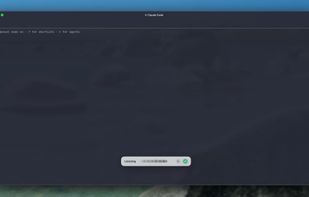
Yap lives in your menu bar and waits for a shortcut. Trigger it and a small window appears near the bottom of the screen with a live waveform and a running preview of what you have said so far. Press the shortcut again and the text gets pasted into the app you were already working in. Every transcript is saved locally, so you can go back and copy something again later.

The default shortcut is Cmd + Shift + D. You can rebind it, or set a single modifier key instead. Tapping right shift on its own works nicely if you have a spare thumb.

Features:

  • On-device transcription through Apple's Speech framework
  • Global shortcut, fully rebindable, with optional single-modifier triggers like right shift
  • Pastes straight into the focused field of whatever app you were in
  • Local transcript history with search, copy, and delete
  • Live waveform and partial transcript while you speak
  • Press escape twice to discard a dictation in progress
  • Follows your system default microphone, including when it changes mid-session
  • Optional launch at login, off by default
  • No account, no network calls, no telemetry

Official Links
