



XSplit Presenter
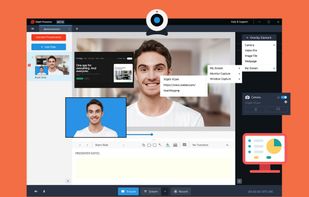
XSplit Presenter makes it easy to share your presentations whether you’re in a conference call or on a live stream.
Cost / License
- Freemium (Subscription)
- Proprietary
Alerts
- Discontinued
Platforms
- Online
Product sold to Videocom - existing licenses were transfered:  VideoCom Presenter

Features
Integrations
 Skype
Skype Youtube
 Zoom
Zoom Microsoft Teams
Features
- Transitions Effects
- Screen Sharing
- Remote Work
- Annotations
- Import from Powerpoint
- Upload directly to YouTube
Tags
- annotate-presentation
- import-from-google-slides
- create-video-presentation
XSplit Presenter News & Activities
Recent News
Recent activities
XSplit Presenter information
Developed by
 SplitmediaLabs
 Licensing
Proprietary and Freemium product.Pricing
Subscription that costs $5 per month + free version with limited functionality.Alternatives
17 alternatives listedSupported Languages
- English


What is XSplit Presenter?
XSplit Presenter makes it easy to share your presentations whether you’re in a conference call or on a live stream.
Import your Google Slides or Microsoft Powerpoint presentation, easily add videos from YouTube, Vimeo, or your computer and connect to your Zoom, Microsoft Teams, Skype, or any other platform to easily give your presentation more flair!
Make your presentations more personal by becoming a part of the presentation Easily add your webcam on top of your presentation and activate your virtual green screen to remove the background in a snap!
Annotate your presentation in real-time A virtual presentation needs a virtual pointer! Help your viewers focus on the right things at the right time with quick and easy annotations that draw their attention.
Keep your desktop private while still being able to share windows and applications Want to show a website or application to illustrate a point during a Q&A? Select and add specific windows or applications to your presentation with a few simple clicks without needing to share your entire screen and avoid any privacy pitfalls!