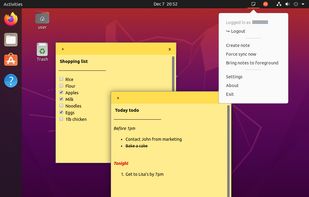
Have you ever needed to remember something real important but had no way to? Catzware introduces Simple Notes, a program which allows you to make up to five notes and keep them open on your desktop all at the same time so you never forget anything again!
Xpad Alternatives
Xpad is described as 'Sticky note application for jotting down things to remember' and is a Note-taking tool in the office & productivity category. There are more than 50 alternatives to Xpad for a variety of platforms, including Windows, Mac, Linux, Android and Web-based apps. The best Xpad alternative is CherryTree, which is both free and Open Source. Other great apps like Xpad are Cryptee, Notefox, Tomboy and Stickies.
Alternatives list
KNote is an easy to use wiki-like note taking program with built in file management and blogging capabilities.
Cost / License
- Free Personal
- Proprietary
Application type
Alerts
- Discontinued
Platforms
- Windows

Mindspace makes it easy to remember things. Users can capture thoughts and ideas as notes, audio streams or sketches and access them from anywhere at any time.
Take notes, anytime, quick, anywhere. Manage your TO-DO list and reminders. Remember things. Note taking on Android.


+3
NoteCard is your Macs visual note taking studio inspired from Stickies - the venerable Mac classic for notes! NoteCard keeps your notes organized the way you like and readily available so you're more productive and inspired to write down your ideas.
Cost / License
- Paid
- Proprietary
Application types
Alerts
- Discontinued
Platforms
- Mac


ActionPad is a replacement application for the original BlackBerry MemoPad. It provides quick access to memos for boosting your productivity.
Cost / License
- Paid
- Proprietary
Platforms
- Blackberry


Sticky is a digital sticky note application designed to help you organize your thoughts, ideas, and tasks in a visual and intuitive way. Organize thoughts, collaborate in real-time, and access your ideas from anywhere.

- 50 Hold My Notes alternatives
Hold My Notes keeps a deck of sticky notes on the right edge of your Mac. At rest it is a thin pill; move the pointer over and the notes fan out. Encrypted on your machine, no account, macOS 13 or later.


+2

Just like stickies, Sticklets are useful, versatile, and powerful. Always available to take quick notes, organise ideas, or brainstorm ideas.


+5