Get more from your WordPress.com plan. WordPress Workspace is a Mac app that brings your site’s voice, content, and context into your daily work.
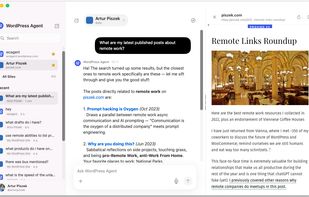
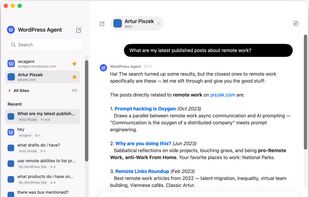
Ask the WordPress Agent from anywhere on your Mac. Dictate, capture screenshots, upload images, and rewrite text, all grounded in the site you already maintain.
One app instead of a scattered stack
WordPress Workspace replaces a handful of paid utilities with tools built around the WordPress.com plan you already pay for. With your WordPress.com plan, you get:
- An agent that already knows your site: Ask the WordPress Agent from anywhere on your Mac, without switching to a browser. It starts from the site you already maintain.
- Quick ask from any app: Trigger the WordPress Agent with a keyboard shortcut for fast answers, from any app on your Mac.
- Dictate in your site's voice: Speak when it is faster than typing, and let your site’s guidelines shape the result.
- Capture and share screenshots: Capture what you are looking at, bring it into the WordPress Agent, or upload it to your site.
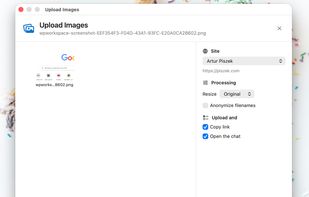
- Upload images to your media library: Move images straight into your WordPress media library, and keep working with them in the WordPress Agent.
There is more to your site than just a site.
WordPress Workspace helps with the business and project work that surrounds your WordPress site, not just the act of editing WordPress itself. It is the first piece of a broader idea: your WordPress.com plan should help you run the business around your site, not just host it.
- Write from what already exists: Ask the Agent to research your existing pages and posts before drafting a new article, landing page, announcement, or product update.
- Improve a page: Get help with copy, structure, calls to action, and redesign ideas using the page and site context you already have.
- Dictate in your site voice: Turn rough speech into cleaner text shaped by your WordPress.com guidelines.
- Work with screenshots: Send a screenshot into the Agent when words are slower than showing what you mean.
- Move images into the right place: Upload images to the media library and keep working with them in the same WordPress-aware flow.
- Transform text anywhere: Select text in another Mac app and reshape it with your WordPress context in mind.
Your context already lives in WordPress
If you blog, publish, sell, document, announce, or run a business on WordPress, your site has been accumulating useful context all along: your voice, audience, archive, offers, media, guidelines, and the shape of your work.
Workspace turns that context into an advantage, so the WordPress Agent can start from what already exists instead of asking you to explain everything from scratch.











 Automattic Inc.
No comments or reviews, maybe you want to be first?