
WINK Reset PRO icon
WINK Reset PRO icon

WINK Reset PRO

 Like

A modern, clean, and safe utility to check and reset Epson and Canon waste ink counter (WIC) for Epson and Canon printers with free trial reset.
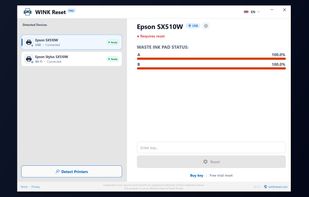
WINK Reset PRO automatically detects USB and Wi-Fi printers, reading exact waste ink pad counter levels (100% Requires Reset).

Cost / License

  • Freemium (Pay once)
  • Proprietary

Since

  • Since 2026

Platforms

  • Windows
0likes
0articles
Save

Features

Highlights All activities

WINK Reset PRO News & Activities

Recent activities

WINK Reset PRO information

AlternativeTo Category

OS & Utilities
WINK Reset PRO was added to AlternativeTo by Maciej Trznadel on and this page was last updated .

No comments or reviews, maybe you want to be first?

Official Links

What is WINK Reset PRO?

WINK Reset PRO is the modern alternative to legacy tools like WIC Reset Utility, PrintHelp, and obsolete Epson Adjustment Programs (AdjProg). It provides an instant, safe, and malware-free way to reset waste ink pad counters and clear blocking service errors on Epson® and Canon® inkjet printers.

If your printer stopped with blinking red lights or displays error messages:

  • "A printer's ink pad is at the end of its service life. Please contact Epson Support."
  • "Parts inside your printer are near the end of their service life."
  • "Service Required" (Error Code E-11, E-10, W-01, 91)
  • Canon Service Error 5B00, 1700, 5B01 (Ink Absorber Full)

WINK Reset PRO unblocks your printer in under 60 seconds without disassembly or costly repair visits.

🚀 Key Features & Advantages:

  • Safe Alternative to WICReset: Clean, modern interface, no bloatware, instant digital key processing.
  • Malware-Free (Better than cracked AdjProg): No risk of trojans or disabled antivirus warnings from shady RAR archives.
  • Free Diagnostics & Trial Reset: Check real-time waste ink levels (Main Pad A & B from 0% to 100%) completely free before purchase, with built-in trial reset.
  • Auto-Detection (USB & Wi-Fi): Instantly scans and recognizes connected local printers.
  • Instant Digital Unlock: Resets EEPROM counter to 0.0% with 1 click and clear power-cycle guidance.
  • Global Localization in 40+ Languages: English, Spanish (Almohadillas de tinta), German (Tintenkissen / Farbkissen zurücksetzen), French (Tampon encreur), Italian (Assorbitore inchiostro), Polish (Reset pampersa), Portuguese (Reset almofada), Turkish (Atık mürekkep sıfırlama).

🖨️ Supported Models & Series:

  • Epson EcoTank (L-Series): L3250, L3150, L3210, L3110, L382, L380, L365, L3050, L120, L220, L3251, L3151, L4150, L4260, L5190, L6190, L805, L1800.
  • Epson EcoTank (ET-Series): ET-2710, ET-2720, ET-2750, ET-2810, ET-2820, ET-2850, ET-3750, ET-4750.
  • Epson Expression (XP-Series): XP-2100, XP-2105, XP-2150, XP-2200, XP-3100, XP-4100, XP-530, XP-540, XP-7100.
  • Epson Stylus & WorkForce: SX510W, SX425W, PX720WD, WF-2830, WF-2850, WF-7710, WF-7210.
  • Canon PIXMA & MegaTank (G-Series): G2000, G2010, G3000, G3010, G2020, G3020, G1010, TS3150, MG3650.

⚡ 3-Step Simple Recovery:

  1. Connect printer via USB and click Detect Printers.
  2. Check live waste ink percentage (reads Pad A & B).
  3. Enter reset key, click Reset Now, restart printer, and resume printing!

WINK Reset PRO Videos