Windrose is a menu bar app for setting fan speed yourself on Apple Silicon Macs with fans (M1 to M5), macOS 13.3 or later.
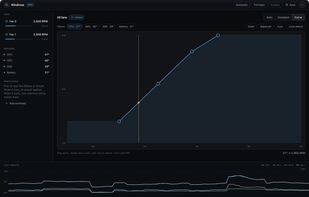
When macOS lets the chip sit hot during a long build or a local model run, you can pick a constant RPM, full blast, or drag a temperature to RPM curve. Live temperatures show in the menu bar.
On some Macs the firmware refuses manual fan control, or takes a few seconds to hand it over the first time. Windrose tells you when control is refused and gives the fans back to macOS, so you're never guessing whether it's doing anything.
Fans return to macOS control on quit, sleep or a crash. A panic temperature opens the fans fully and holds them at max through a crash until the Mac cools, then hands back to Auto.
Free: every fan mode, including temperature curves, plus live telemetry and look-ahead (fans speed up early while temperature is rising).
Pro, a one-time purchase that covers all your Macs: workload profiles (pick Ollama, LM Studio, Xcode, ffmpeg or Final Cut and its preset applies while it runs), saved presets, per-fan control, curves that follow the hottest of several sensors, and session CSV export. 14-day Pro trial from first open. No account, no subscription.
Limits: Apple Silicon only, no Intel. Tested first-hand on a 16-inch MacBook Pro with M1 Max; the same fan-control method has been measured by others on newer chips, but not every model has been checked. Notarized direct download; the App Store sandbox doesn't allow fan control.







 John Wilson added Windrose as alternative to Macs Fan Control and TG Pro


No comments or reviews, maybe you want to be first?