


W
WhatChanged
Like
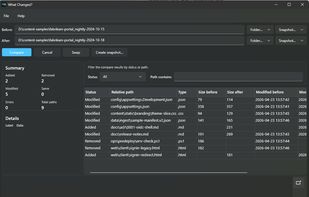
Offers free folder or snapshot comparison on Windows, identifies added, removed, modified, and unchanged files, provides detailed file inspection, supports light and dark themes, and enables Pro features like snapshot creation, CSV and HTML report export for sharing.

Cost / License
- Freemium (Pay once)
- Proprietary
Application type
Platforms
- Windows


Features
Highlights All activities
WhatChanged News & Activities
Recent activities
- kaj_t added WhatChanged
- Mauricio B. Holguin updated WhatChanged
- kaj_t added WhatChanged as alternative to Beyond Compare, Meld and WinMerge
Developed by
 Lingonberry Byte Co.
 Licensing
Proprietary and Freemium product.Pricing
One time purchase (perpetual license) that costs $29 + free version with limited functionality.Alternatives
3 alternatives listedBadge
Get an embeddable badge for WhatChangedSupported Languages


No comments or reviews, maybe you want to be first?