WePrintEasy is a free, open-source tool for Windows terminal servers (Remote Desktop Session Hosts). It gives every Active Directory user or group a fixed default printer and keeps it there.
On Remote Desktop servers the default printer keeps changing. Windows makes the last-used printer the default (“Let Windows manage my default printer”). RDP printer redirection makes the client PC’s printer the session default, often a few seconds after logon. Applications and users change it during the session. Assigned network printers are sometimes not connected yet. Group Policy alone often can’t cope with this timing.
WePrintEasy solves it with a small PowerShell agent that a scheduled task starts in every user session. At logon and reconnect it sets the assigned printer. For the first two minutes it checks every 3 seconds and resets the default printer whenever something changes it. Optionally it keeps watching for the whole session, every 30 seconds by default.
Key features:
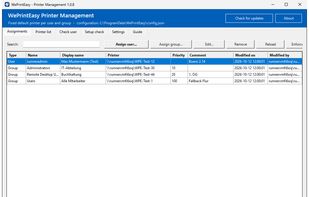
Default printer per AD user or AD group, with group priorities and support for nested groups
Works with network printers (\server\share), local printers and redirected client printers (wildcards match the printer of a home-office PC)
Connects missing network printers automatically at logon
Turns off “Let Windows manage my default printer” for each user; can optionally set the RDS policy that stops the client default printer from taking over
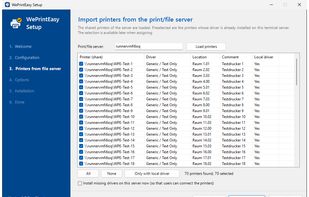
Graphical setup wizard (Windows installer .exe) that reads printers directly from your print server
Admin console: assign printers, check which printer a user gets and why, system check with traffic-light status
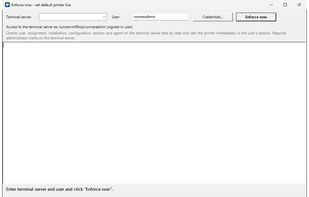
“Enforce now (live)”: remote, step-by-step diagnostics for one user on a specific session host
RDS farm support: one central config.json on a file share is used by all session hosts
PowerShell module (Get-/Set-/Remove-WpeAssignment) and CSV bulk import
Optional Authenticode code signing (self-signed or company CA), running with ExecutionPolicy AllSigned
Updates keep all settings; clean uninstall via Windows “Apps”
English and German user interface
Built for production servers:
No extra software: only Windows PowerShell 5.1, which ships with Windows Server
No AD schema extension, no RSAT, nothing to install on client PCs
Assignments are stored by SID, so renaming users or groups is safe
No telemetry: everything runs on your own servers. The only outbound request is an optional, configurable update check.
Supported systems: Windows Server 2019, 2022 and 2025 with the Remote Desktop Session Host role in an Active Directory domain.






 EU
EU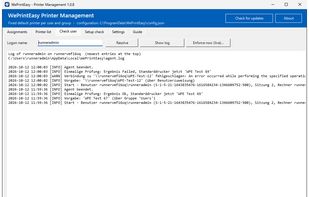




 Leon-E. M.
No comments or reviews, maybe you want to be first?