WebDiff is a desktop application for macOS and Windows that lets you compare two versions of a website — for example, before and after a CMS, theme or plugin update — to instantly spot any unwanted change. It was built by TangoDev, an Italian software agency, out of a very concrete need: making the process of updating client websites safer and faster.
Every comparison runs 100% locally on your computer: no data is sent to third-party servers, and WebDiff works with websites on localhost, behind a VPN, on a local network, or protected by HTTP authentication.
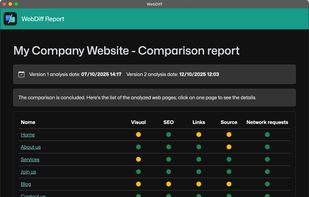
For each pair of web pages, WebDiff generates a report covering:
- Visual comparison — pixel-level differences, both on desktop and mobile resolution
- Source code comparison — checks whether the page's HTML structure has changed
- SEO comparison — title, meta description, canonical tag, H1 and other key SEO elements
- Links comparison — internal and external links
- Network requests comparison — new or changed scripts, assets and API calls
Pages can be added manually or imported directly from a sitemap (up to 1,000 URLs at once). Reports use color-coded traffic lights to highlight issues at a glance, and can be exported as PDF or ZIP to share with clients or teammates. A "Continuous analysis" feature turns the latest comparison into a new baseline, making it easy to monitor a website over time (e.g. week after week).
WebDiff is sold as a one-time purchase, with no subscription: unlimited websites, unlimited comparisons.






 EU
EU


 Leonardo Tonghini added WebDiff as alternative to Percy by BrowserStack, Applitools Eyes, Argos CI, Pixeleye and 1 more


 TangoDev

No comments or reviews, maybe you want to be first?