Web Cloner copies an entire website to your Mac so it opens offline, with links, stylesheets and images rewritten to point at the local copy. It puts a native SwiftUI window on top of wget, so there is no Terminal and no flags to remember, and every flag is still there when you want one.
Three jobs, one window:
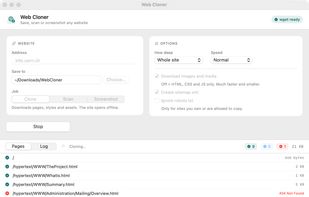
- Clone: pages, CSS, JavaScript and images, with links rewritten so index.html works with the internet switched off.
- Scan: walks the site without saving a byte and lists every page it finds, including the links that are broken.
- Screenshot: a full-page PNG of each page, rendered in WebKit at 1280, 1440 or 1920 px.
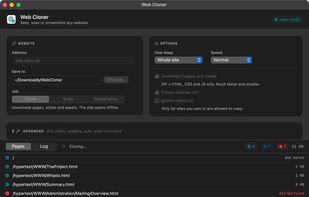
Every run writes a sitemap.xml, and the page list fills in as the job runs, showing each URL with its size and state: downloading, done, failed or redirected.
Most site copiers quietly lose the images. Sites serve their pictures and fonts from a separate CDN domain, which a single-host mirror skips, and some write them in a form that wget reads as a broken path. Web Cloner reads the saved pages afterwards, downloads whatever still points somewhere else, and relinks every reference to the local file. On a test Webflow site that took the result from 11 files and 221 KB to 30 files and 1 MB, with nothing left loading from the internet.
For developers, an Advanced panel maps straight onto wget: skip paths, restrict to one section, reject URLs by regular expression or by file type, allow extra asset domains, cap the download size, send custom request headers for a logged-in copy, HTTP auth, keep the original links untouched, ignore SSL errors. One button copies the exact wget command for a script.
wget installs itself through Homebrew on first launch if it is missing. The app checks GitHub for new releases and replaces itself in place, so there is nothing to download or delete later.
Universal binary for Intel and Apple Silicon, macOS 13 or later. MIT licensed, no account, no telemetry, no paid tier.








 Sarim Yaseen
No comments or reviews, maybe you want to be first?