
Web Clipper for NotebookLM icon

Web Clipper for NotebookLM

Your ultimate NotebookLM companion: saves web pages, PDFs, and YouTube videos (including full channels and playlists) to NotebookLM in one click, and extends it with Google Drive auto-sync, bulk delete, notebook duplication, artifact exports, and more.
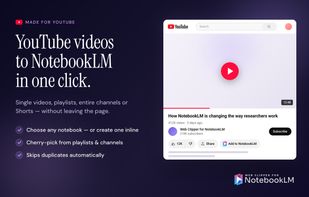
Youtube to NotebookLM - Single video, Youtube Playlist, Youtube Channel, Youtube Shorts

Cost / License

  • Freemium (Pay once or Subscription)
  • Proprietary

Platforms

  • Google Chrome
Add any web content to NotebookLM in just a click with the side panel.
Google Drive Auto-Sync - Keep your sources always up to date.
+2
Web Clipper for NotebookLM extends the capabilities of NotebookLM with features like Delete all sources, duplicate notebook, export artefacts in many different format.
0likes
0comments
0alternatives
0articles

Features

Web Clipper for NotebookLM News & Activities

Highlights All activities

Recent activities

Web Clipper for NotebookLM information

  • Developed by

    Web Clipper for NotebookLM
  • Licensing

    Proprietary and Freemium product.
  • Pricing

    One time purchase that costs $69, and / or subscription ranging between $1 and $5 per month + free version with limited functionality.
  • Alternatives

    0 alternatives listed
  • Supported Languages

    • English
    • Japanese
    • Korean
    • Chinese
    • German
    • French
    • Spanish
    • Portuguese
    • Polish
    • Russian
    • Czech
    • Italian

AlternativeTo Category

Web Browsers
Web Clipper for NotebookLM was added to AlternativeTo by WebClipperNotebookLM on and this page was last updated .
No comments or reviews, maybe you want to be first?

What is Web Clipper for NotebookLM?

Web Clipper for NotebookLM is your ultimate companion for Google NotebookLM. The free Chrome extension cuts out the manual work of getting sources into NotebookLM and getting NotebookLM's output back out — so you can spend time on the research, not the plumbing.

Save sources from anywhere in one click

Works on any web page or PDF you open in your browser. On top of that, it adds purpose-built support where it matters most:

  • YouTube: add any video or Short. Add an entire channel or playlist, or hand-pick the videos you want.
  • PDFs: a floating button appears on any PDF, including arXiv papers. No downloading and re-uploading.
  • AI chats: clip full conversations or individual messages from ChatGPT, Claude, Gemini, DeepSeek, and more.
  • X, Reddit, Note.com, Naver News: one-click clipping with smart handling of threads, replies, and paywalled previews.

Extend NotebookLM with capabilities it doesn't ship with:

  • Google Drive auto-sync: Docs, Slides, Sheets, and PDFs imported from Drive don't refresh in NotebookLM when the originals change. Sync any source manually with one click, or enable AutoSync per notebook so updates flow in automatically.
  • Duplicate any notebook: clone an entire notebook (every source, every Drive link) without rebuilding it by hand. Drive sources keep their live connection on the copy.
  • Bulk delete sources: a trash button in the Sources panel lets you search, filter, and remove dozens of sources in one batch instead of clicking through them one by one.
  • Export artifacts: send flashcards and quizzes to Anki, Excel, or JSON; mind maps to FreeMind, OPML, Markdown, or Obsidian Canvas; reports and notes to Word, PDF, or Markdown; slide decks to PNG zips. The export menu sits in NotebookLM's native artifact menu.
  • Export chat conversations: turn full NotebookLM chats into polished Markdown or PDF, with citations preserved and mapped back to their sources.

A side panel that follows your work:

Open the side panel from any tab to target any notebook, switch between Google accounts (personal / school / work), and manage sources without leaving the page you're reading.

Official Links