WavMasta is a free, open-source desktop app that takes your finished mix and makes it release-ready. It's made for home-studio musicians and creators of AI-generated songs who want a clean, streaming-ready master without paying per song for an online service or wiring up a chain of plugins.
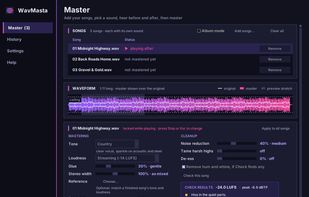
Drop in a song and click Check. WavMasta measures loudness and true peak and tells you in plain English what it found: steady hiss, mains hum, a whine, fizzy or harsh highs, sharp "s" sounds in the vocal, clipping, dead air at the start or end, and endings that stop suddenly. "Use suggestions" sets the cleanup for you.
Mastering covers the standard steps: gentle tone presets (Neutral, Country, Roots rock, Pop, Warm, Bright) or matching the tone and loudness of a reference song you like, glue compression, stereo width that keeps the bass centred, and loudness targets for Spotify and YouTube (-14 LUFS), Apple Music (-16), or louder. A look-ahead true-peak limiter keeps peaks under the ceiling without clipping, so streaming services don't turn the song down or add distortion.
Before and After play the loudest part of the song at matched loudness, so you hear the real difference rather than just "louder". A waveform view draws the master over the original. Album mode masters a whole set together, matching each song's tone and loudness so the record plays as one. Every master gets a short report: clipping, peak, loudness, punch and what the cleanup removed.
Saves WAV 24-bit (for distributors like DistroKid, CD Baby and TuneCore), WAV 16-bit with dither, FLAC or MP3 320. It runs entirely on your computer: nothing is uploaded, and your original file is never changed. There's also a command line for batch jobs.
Windows installer on itch.io (pay what you want, free is fine). macOS and Linux run it from source with Python. MIT licensed.






 Bill Skinner added WavMasta as alternative to LANDR, Wavemod and WaveDisco Studio
 Skynr Labs


No comments or reviews, maybe you want to be first?