Voltura WeekNumber icon

Voltura WeekNumber

Voltura WeekNumber keeps the current week number visible in your notification area, right beside the Windows clock.
Voltura WeekNumber screenshot 1

Cost / License

  • Free
  • Open Source (MIT)

Platforms

  • Windows
Voltura WeekNumber screenshot 1
Alternatives
1like
0alternatives
0articles
Save

Features

Highlights All activities

Voltura WeekNumber News & Activities

Recent activities

Voltura WeekNumber information

GitHub repository

  •  1 Stars
  •  0 Forks
  •  1 Open Issues
  •   Updated  
View on GitHub
Voltura WeekNumber was added to AlternativeTo by IzNoGud78 on and this page was last updated .

No comments or reviews, maybe you want to be first?

Official Links

What is Voltura WeekNumber?

Voltura WeekNumber keeps the current week number visible in your notification area, right beside the Windows clock.

The number changes automatically as each new week begins. The calendar is there when you need more than a glance.

The week number is the feature. Open the calendar only when you want to look further.

  • Always visible: See the current week on a calendar icon in the Windows notification area.
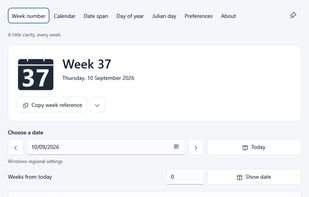
  • Any date, one click away: Choose any date to see its week number, then return to today with one click.
  • Your calendar rules: Follow Windows, use ISO 8601, or choose your own week rules.

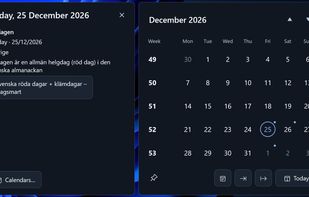
Your calendar, one click away. Left-click the week-number icon to open a compact month calendar, with a clear week number beside every row. Click the heading to browse months, then decades. Each month shows its week range, and all week numbers follow your existing calendar preferences. Select a date without losing sight of today. Pin the calendar to keep it above other windows while you plan, independently of the main window. Drag the calendar’s top area to position it beside your work. Reopening restores its default position. Click the icon again or press Escape to hide it. Clicking elsewhere also closes it when it isn’t pinned. Take your week numbers into another calendar. Export the displayed month or year with the button beside Today, or right-click a date or week to choose a period. Your holidays and appointments belong beside your week numbers. Calendar imports put them in the tray calendar, with subtle dots marking event dates and details just a click away. Event dots keep the month quiet. Select a date to see the details beside it.

Useful tools. Kept simple. Open the app for deeper calendar and date work.

  • Calendar, import, and export: Clear week numbers and date ranges, your imported events in the tray calendar, and week-number exports for other calendar apps.
  • Date span: Compare two dates by calendar days, weekdays, weekend days, or whole weeks.
  • Week navigation: Move one week at a time, or jump a chosen number of weeks from today.
  • Find and copy: Find a week’s date range, then copy its ISO, short, or localized reference.
  • Date tools: Find a date’s day-of-year or Julian day number, or convert either number back to a date.
  • Keyboard shortcuts: Choose global shortcuts to open Week number or Calendar from another app while Voltura WeekNumber is running.

Quietly does its job.

  • Works offline: Calendar lookups need no connection.
  • Looks at home: Light, dark, or system appearance with customizable icon colors.
  • Speaks your language: Choose from 21 languages or follow Windows.
  • Stays out of the way: Closing the window leaves the week number available in the tray.

Voltura WeekNumber Videos