WINDOWS
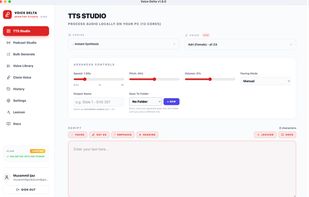
Voice Delta Desktop Studio for Windows turns text into natural-sounding speech on your PC. Choose from 50+ built-in voices, preview voices before generating, and create audio in 50+ languages. Adjust speed, pitch, emotion, and pacing to suit your project. Clone a voice from a 5-second sample in English, French, German, Portuguese, Italian, or Spanish, with Hindi voice cloning available in beta. Use Podcast Studio to assign voices to different speakers and generate dialogue with pauses between turns. Export your audio as a 24 kHz WAV file. Speech is generated locally, so your scripts and audio stay on your computer. Generation works offline after you install the required voice models. No dedicated GPU is required. Requires Windows 10 or 11, 64-bit. Internet is needed for downloads and account services.
MAC
Voice Delta Desktop Studio for Mac turns text into natural-sounding speech on your Apple Silicon Mac. Choose from 50+ built-in voices, preview voices before generating, and create audio in 50+ languages. Adjust speed, pitch, emotion, and pacing to shape your narration. Clone a voice from a 5-second sample in English, French, German, Portuguese, Italian, or Spanish. Use Podcast Studio to assign voices to speakers and generate dialogue with pauses between turns. Export your audio as a 24 kHz WAV file. Speech is generated locally, so your scripts and audio stay on your Mac. Generation works offline after you install the required voice models, and no dedicated GPU is required. Requires an Apple Silicon Mac with M1 or newer and the ARM64 installer. Intel Macs are not supported. Internet is needed for downloads and account services.
ONLINE Web App
Voice Delta Online lets you create AI narration in your browser on a computer, phone, or tablet. Choose from 50+ built-in voices, generate speech in 50+ languages, and adjust speed, pitch, emotion, and pacing. Clone a voice from a 5-second sample in English, French, German, Portuguese, Italian, or Spanish, with Hindi voice cloning available in beta. Create multi-speaker conversations with Podcast Studio, then export audio as a 24 kHz WAV file and download SRT or VTT subtitles. Each generation supports up to 100,000 characters. The free plan includes 1,000 characters per day; Pro and Lifetime plans include unlimited daily generation. Cloud generation continues after you leave the browser, and your history and cloned voices are available when you sign in again.







 Muzammil-Ijaz added Voice Delta as alternative to Voxtral, VoiceStudio, VoiceCraft, SherpaTTS and 47 more

No comments or reviews, maybe you want to be first?