
Video2Any icon
Video2Any icon

Video2Any

Turn lecture, course and meeting recordings into slides — PPTX, PDF, Word or Markdown — right in your browser, without uploading the video.
Video2Any screenshot 1

Cost / License

  • Freemium (Pay once)
  • Proprietary

Platforms

  • Online
  • Google Chrome
  • Microsoft Edge
0likes
0articles
Save

Features

Highlights All activities

Video2Any News & Activities

Recent activities

Video2Any information

  • Developed by

    CN flagLarry Xue
  • Licensing

    Proprietary and Freemium product.
  • Pricing

    One time purchase (perpetual license) ranging between $3 and $49 + free version with limited functionality.
  • Alternatives

    2 alternatives listed
  • Badge

    Get an embeddable badge for Video2Any
  • Supported Languages

    • English
    • Chinese
    • Japanese
    • Korean
    • Spanish
    • Portuguese
    • French
    • German

AlternativeTo Category

Photos & Graphics

Popular alternatives

View all
Video2Any was added to AlternativeTo by yujian-xue on and this page was last updated .

No comments or reviews, maybe you want to be first?

Official Links

What is Video2Any?

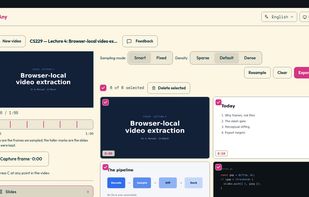
Video2Any pulls the slides out of a recorded lecture, webinar, course or meeting and gives them back as a deck you can edit. Open an MP4, WebM or MOV (or capture a video playing in another tab with the browser extension) and it detects each new slide, drops duplicates and frames that are not slides (a speaker on camera, for example), and lets you review the result before exporting.

Exports: editable PowerPoint (PPTX), PDF, Word, Markdown, a single overview image, a ZIP of images, or the audio track. Batch mode handles a whole folder of recordings at once.

Everything runs on your own device: the video is never uploaded. The first 30 minutes of every video are free; longer recordings can be unlocked per video or with a yearly or lifetime plan.