🏃 Slow Motion Playback & Frame Analysis
• Smooth slow-motion playback with frame-by-frame control
• Precise pause and frame advance for detailed motion study
• Analyse technique, timing, posture, and movement efficiency
• Designed for short high-detail clips (typically 5–30 seconds)
🤖 AI Body Tracking & Motion Visualisation
Use built-in computer vision tools to analyse human movement:
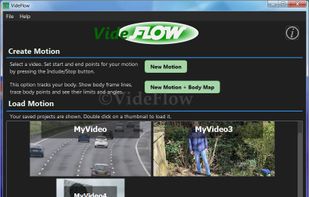
• AI body tracking maps full-body motion through video
• Display skeletal body frame overlays
• Draw motion traces for body points over time
• View directional limits of movement (up/down/left/right)
• Analyse joint angles and detect maximum/minimum range of motion
🎯 Custom Object Trackers
Track any object in motion, such as sports equipment:
• Two custom tracking points for flexible analysis
• Track balls, rackets, skateboards, or any moving object
• Generate motion traces and path visualisation
• Measure movement direction and limits over time
🎬 Export & Save Analysis
• Export analysed videos as MP4 (watermarked)
• Save analysis states at different stages
• Revisit and continue work on previous motion sessions
• Share results with coaches or training partners
🔒 Offline, Private & Lightweight
• Fully offline – no internet connection required
• No adverts in the free version
• No personal data collected
• Runs entirely on your device for full privacy
?? Performance Notes
• Best suited for short video clips (5–30 seconds)
• Video processing is memory intensive
• App adapts to available system resources automatically
• AI body tracking is compatible with older systems, but performs best on modern devices (recommended CPU > 2.0 GHz)
• Higher frame rate (60 fps+) improves tracking accuracy for fast motion
🌍 Language Support
Supports multiple languages including Arabic, Dutch, French, German, Spanish, Italian, Portuguese, Russian, Chinese, Japanese, Korean, Hindi, Turkish and more.






 sunbyte added VideFlow as alternative to Kinovea, SwingVision, Nacsport, KineticLab and 8 more


 Sun Byte Software

No comments or reviews, maybe you want to be first?