
Vicoa icon
Vicoa icon

Vicoa

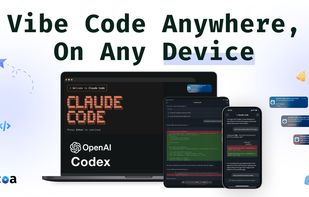
Vicoa lets you run a team of coding agents (Claude Code, Codex, and OpenCode) anywhere, on any device. Start coding on your laptop, switch easily to mobile or web, get alerts when your AI agent needs input, and approve changes with one tap.
Vicoa screenshot 1

Cost / License

  • Freemium (Subscription)
  • Proprietary

Application type

Platforms

  • iPhone
  • iPad
  • Online
  • Windows
  • Android
  • Software as a Service (SaaS)
  • Self-Hosted
0likes
0comments
0articles

Features

Properties

  1.  Lightweight
  2.  Support for Themes

Features

  1.  Syntax Highlighting
  2.  Code Formatting
  3.  Extensible by Plugins/Extensions
  4.  Dark Mode
  5.  Ad-free
  6.  AI-Powered

Vicoa News & Activities

Highlights All activities

Recent activities

Vicoa information

  • Developed by

    BetterBit
  • Licensing

    Proprietary and Freemium product.
  • Pricing

    Subscription ranging between $12 and $10 per month + free version with limited functionality.
  • Alternatives

    3 alternatives listed
  • Supported Languages

    • English

AlternativeTo Category

Development

Apple AppStore

  •   Updated 
  •   4.23 avg rating
View in AppStore
Vicoa was added to AlternativeTo by nicktay on and this page was last updated .
No comments or reviews, maybe you want to be first?

What is Vicoa?

Vibe Code Anywhere (Vicoa) is the easiest way to use Claude Code on any device. Start coding on your laptop, continue seamlessly on your phone or tablet, and never miss an important moment when your AI agent needs your input.

Vicoa was built for developers who want to stay in flow even when they step away from their desk. Whether you’re waiting for a build, running a long task, or need to approve an agent’s next step, Vicoa keeps you connected.

Key Features:

• Continue Claude Code sessions across laptop, mobile, and tablet

• Get instant alerts when your AI agent needs clarification or has finished a task

• Pick up right where you left off, even if your laptop is running a long process

• See live updates from your agent in real time

• Simple setup – connect once and stay in sync

How It Works:

  1. Install the Vicoa CLI on your terminal
  2. Sign in to authorize the terminal
  3. Start a Claude Code session as usual and switch between devices at any time

Perfect for developers who:

• Step away from their desk but want to stay productive

• Run long-running AI tasks that need occasional input

• Work flexibly across laptop, tablet, and phone

• Want to code from the couch, coffee shop, or on the go

Vicoa is your companion for Claude Code and Codex – designed to keep you in control and your workflow uninterrupted, wherever you are.

Download Vicoa and start vibe coding anywhere anytime!

Vicoa Videos

Official Links
