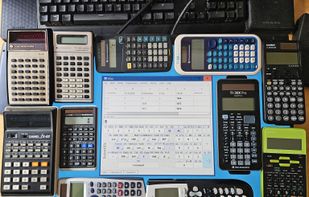
ViCalc is an open-source, touch-typing optimized scientific calculator designed to turn your PC keyboard—especially the numeric keypad—into a fast and powerful calculaton workstation. While it provides full mouse support for traditional point-and-click operation, its core strength lies in seamless ten-finger keyboard efficiency.
Key Features & Highlights
Touch-Typing Optimized Layout:
ViCalc splits input tasks between both hands to maximize speed. The right hand operates the numeric keypad while the left hand stays on the standard home row (ASDF) to trigger modifiers, exponents, and secondary/tertiary functions via Shift and Ctrl keys.
Dual Keyboard Modes:
Mode 1 (Numpad + Left Hand): Ideal for desktop full-size keyboards. The right hand handles numbers while the left hand accesses extended scientific functions.
Mode 2 (Home Row / Laptop Layout): Designed for laptops or keyboards without a dedicated numeric keypad, allowing seamless touch-typing across standard letter keys.
Analog Key-Preselection:
Developed and tested with analog keyboards (such as the Wooting Two HE), this unique feature previews and highlights a key's function on-screen when pressed lightly before execution. Fully pressing the key executes the function, while releasing it cancels the input without triggering an error. (Note: Standard digital keyboards remain fully supported without this preview feature).
Expression Line & Calculation History:
Displays current mathematical expressions clearly and automatically logs past outputs for easy reviewing or reusing in subsequent steps.
Comprehensive Mathematical Capabilities
ViCalc provides a wide array of mathematical, scientific, and engineering tools:
Basic & Advanced Arithmetic: Arithmetic operations, parentheses, percentages, percentage changes, reciprocals, absolute values, factorials, permutations, and combinations.
Scientific & Trigonometric Functions:
Trigonometric, inverse, hyperbolic, and inverse hyperbolic functions; support for Degrees, Radians, and Gradians with angle conversions.
Logarithms & Powers: Natural, base-10, and arbitrary-base logarithms, power, roots, exponential functions, and scientific constants.
Unit & System Conversions: Coordinate conversion (Rectangular <> Polar), Sexagesimal <> Decimal (DMS <> DD), number base conversions (Hex, Dec, Oct, Bin), and American Wire Gauge (AWG) conversions.
Solvers & Engineering Tools: Linear functions, quadratic equations, linear systems of two equations, ratio calculations, and display formatting (Sci/Fix/Eng).






 EU
EU


 Kudaschov added ViCalc as alternative to Windows Calculator, SpeedCrunch, Qalculate!, RealCalc Scientific Calculator and 7 more
 Vitali Kudaschov


No comments or reviews, maybe you want to be first?