Vaultime is a free and open source desktop app that tracks how long you play PC games, whichever launcher starts them. It runs quietly in the background, notices when a game starts and records three times for every session. How long the game was open, how long you actually played and how long it sat idle. Keyboard, mouse and controller input count as activity, and time while the PC sleeps never counts.
It finds installed games from Steam, Xbox, Epic Games, GOG, EA, Ubisoft, Battle.net, Riot, Heroic, Lutris and more, and any other game can be added by hand. A game owned in two launchers can count as one. Playtime Steam recorded before Vaultime is shown apart from the time Vaultime tracked.
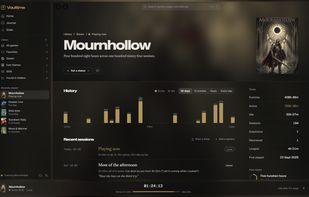
Your play history reads like a journal. Every session is written as a sentence beside the game's cover, week by week, with the screenshots you took in Steam during the session. Stats show a calendar of every day, the hours you play and your games month by month, plus a picture of your year to share. Covers come from your own game folders, and the app takes its colors from the game in front.
Sessions are stored as an append-only, hash-chained history. Trust labels show clock jumps, crashes and most edits made outside the app instead of hiding them in a total.
Everything stays on your PC. There is no account to create, no analytics and no telemetry, and the app works fully offline. Backups run daily by themselves, a sync folder in Dropbox, Google Drive, OneDrive or Syncthing keeps them on your other PCs, and the sessions of several PCs merge into one history. Optional cloud backup goes to a server you run yourself with Docker, encrypted on your PC before anything leaves it.
Available for Windows 10 and 11 (installer without admin rights) and Linux (.deb, .rpm and AppImage). The app is licensed under GPL-3.0-or-later, the optional server under AGPL-3.0-or-later.







 Dorsch added vaultime as alternative to Playnite, PlayTracker, PlayLog: Video Game Tracker and Gaming Gaiden


No comments or reviews, maybe you want to be first?