The Xeneon Edge™ comes with a widget dashboard that operates exclusively within Corsair iCUE on Windows. For macOS, the panel acts as a secondary display. Vardek recreates this layer natively for the Mac, offering a full-screen grid of widgets that operates entirely on your device, without the need for a cloud, an account, or telemetry.
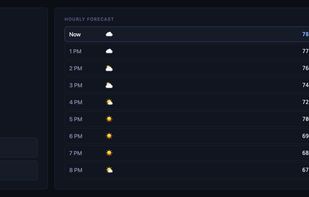
Widgets that can run on your device do so. Certain features, such as clocks and life-progress bars, are purely local and require no network. Some widgets, like the ISS tracker, only fetch a small amount of data and compute the rest on-device. If a widget requires live data, such as weather updates or earthquake alerts, it only makes the necessary API calls listed in its manifest. No other data leaves your Mac. Some widgets store their API keys in the macOS Keychain, not in a plaintext config file.
The product comes with eight bundled widgets. You can add your own by dropping them into the designated folder and rescanning. Additional widgets can be installed without updating the app. The add-on widget repository is open source. Simply grab a widget, drop it in the folder, and rescan. The authoring guide and PRs are also welcome.
You can manage everything from the Admin panel. Open it as an app window or in any browser at the specified local address. There are no config files to manually edit. The panel provides live status, widget library and placement, per-widget settings, layout profiles, background, brightness, and sensor picks.
You can arrange the panel directly: drag widgets onto a live page map, resize with per-widget size chips, and filter the library as you type. The entire editor is also keyboard-operable. Removals prompt for confirmation and offer a 10-second Undo. Each change is confirmed with a "Saved ?" pulse.
The design is local-only. All components run on your Mac over the local host; nothing listens on your network. The only traffic that leaves your Mac is the specific API call a widget you enable makes. This is limited to the exact hosts that the widget declares. Full details can be found at vardek.app.