USB Autorun Virus Protector AlternativesAnti-Malware Apps like USB Autorun Virus Protector

USB Autorun Virus Protector is described as 'A simple and portable tool to protect USB storage drives against spreading of Autorun.inf viruses through the USB drives by creating some un-deletable dummy files in your USB drive' and is a Anti-Malware app in the development category. There are eight alternatives to USB Autorun Virus Protector for Windows. The best USB Autorun Virus Protector alternative is No Autorun, which is both free and Open Source. Other great apps like USB Autorun Virus Protector are Panda USB Vaccine, Bitdefender USB immunizer, Penteract Disguised-Keyboard Detector and Autorun Eater.

Copy a direct link to this comment to your clipboard
USB Autorun Virus Protector alternatives page was last updated

Alternatives list

  1. No Autorun icon
     8 likes

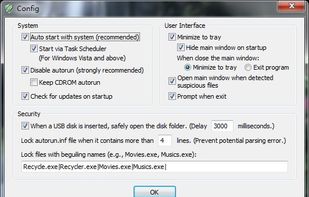
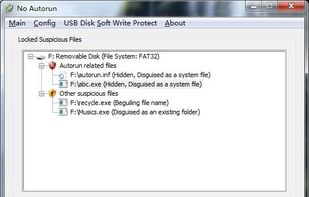
    A tool to block viruses in USB flash/disk from auto-running. When a USB disk is inserted, this tool not only locks the "autorun.inf" file, but also locks all the autorun-related virus and other suspicious files.

    Cost / License

    • Free
    • Open Source

    Application type

    Platforms

    • Windows
     
  2. Panda USB Vaccine is a free utility from Panda Research which helps prevent malware infections due to the autorun feature of Windows Operating Systems. Once executed the user can choose two types of vaccinations: Computer Vaccination or USB Drive Vaccination.

    Cost / License

    • Free
    • Proprietary

    Platforms

    • Windows
     
  3. The USB immunizer is BitDefender's response to this growing issue. This small utility is divided in two sections.

    Cost / License

    • Free
    • Proprietary

    Platforms

    • Windows
     
  4. Autorun Eater icon
     3 likes

    Autorun Eater was born due to the increase of malwares using the ‘autorun.inf’ method to infect users unknowingly be it from flash drives, external hard disks or any other removable storage device.

    12 Autorun Eater alternatives

    Cost / License

    • Free
    • Proprietary

    Application type

    Alerts

    • Discontinued

    Platforms

    • Windows
     
  5. USB Defender icon
     2 likes

    USB Defender was developed to be extremely easy in use. You can see just two buttons on it: "Protect" and "Unprotect". First button you are using to vaccinate your drive, second - to remove protection.

    Cost / License

    • Free
    • Proprietary

    Platforms

    • Windows
     
  6. Pocket Ninja protects private photos, confidential reports, personal journals, financial data, and all other personal files on your USB Storage Devices

    Cost / License

    • Paid
    • Proprietary

    Platforms

    • Windows
     
8 of 8 USB Autorun Virus Protector alternatives