Universal Installer icon

Universal Installer

A modern Android app for installing and managing APK packages with split APK support, silent install via Shizuku, and VirusTotal malware scanning.

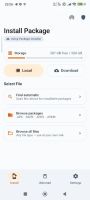
Universal Installer screenshot 1

Cost / License

Application type

Platforms

  • Android  Universal Installer is in closed testing on Google Play.
  • F-Droid
3likes
0comments
0articles

Features

Properties

  1.  Lightweight

Features

  1.  Ad-free
  2.  Dark Mode
  3.  No registration required
  4.  Software Installer

Universal Installer News & Activities

Highlights All activities

Recent activities

Universal Installer information

  • Developed by

    VN flagpass-with-high-score
  • Licensing

    Open Source (GPL-3.0) and Free product.
  • Alternatives

    5 alternatives listed
  • Supported Languages

    • English

AlternativeTo Category

OS & Utilities

GitHub repository

  •  117 Stars
  •  8 Forks
  •  6 Open Issues
  •   Updated  
View on GitHub
Universal Installer was added to AlternativeTo by Emin on and this page was last updated .
No comments or reviews, maybe you want to be first?

What is Universal Installer?

Universal Installer is a modern Android package manager that handles what the default installer can't — split APKs, bundled archives with OBB data, silent installs, and downloads from URLs. All wrapped in a clean Material 3 UI.

Supported Formats

  • APK — Standard Android packages
  • APKS — Split APK bundles
  • XAPK — Compressed split bundles (APKPure format) with OBB
  • APKM — Split bundles (APKMirror format)

Install From Anywhere

  • Local file picker — Three modes: auto-scan device storage, browse packages only, or browse all files
  • Remote download — Paste a URL; the package lands in Download/UniversalInstaller/ with its real filename, visible in any file manager
  • Download history — Re-install from history, copy source URLs, manage files without digging through file managers
  • Chrome / Gmail / Telegram integration — Open downloaded APKs from any source, even when the URL has no extension

Preview Before Installing See app name, icon, version, package, file size, min/target SDK, supported CPU architectures, languages, permissions, split count, and OBB count — all before you commit.

OBB Support

  • Bundled OBBs inside XAPK/APKM are detected and copied automatically to Android/obb/
  • Standalone .obb files can be attached to any APK via the preview sheet (great for apps split across multiple sources)
  • Runs as a foreground worker with progress notification — keeps copying even if you leave the app
  • Smart fallback: direct I/O ? Shizuku ? SAF (per-package folder grant)

Shizuku Power User Features With Shizuku enabled:

  • Silent install / uninstall (no system prompts)
  • Replace existing, allow downgrade, grant all permissions, allow test/debug packages, bypass low target SDK block, install for all users
  • Set Install Source — Spoof the installer package (Google Play, Aurora, F-Droid, Amazon, Samsung, Huawei, Xiaomi, or custom) so apps with "installed from Play Store" checks accept your sideload

App Manager

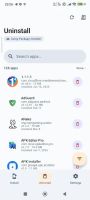
  • Full list with APK size, install date, last-used time
  • Sort by Name / Size / Installed / Last used — ascending or descending
  • Batch select via long-press
  • Filter FAB for quick sort/filter; long-press FAB to scroll to top
  • Uninstall logs with success/failure reason

Sync & Share (LAN File Server)

  • Built-in HTTP server to share and manage your packages across a local network (Wi-Fi)
  • Beautiful web dashboard to download APKs to PC or upload new ones directly to your phone
  • Real-time download progress and transfer tracking directly in the app
  • Optional PIN protection to secure your file sharing sessions

Privacy

  • No internet required for core functionality
  • VirusTotal scanning is optional and uses your own API key
  • No ads, no tracking, no data collection
  • Fully open source — inspect the code yourself

Device Utilities

  • Storage card on the Install screen — free / total space at a glance
  • Install history with per-app success/failure and error reasons
  • Progress notifications for downloads, installs, and OBB copy