This chrome extension will become an assistant in your pursuit to control the time we spend every day in infamous time-sinks: Facebook, Youtube, Twitter, and Reddit.
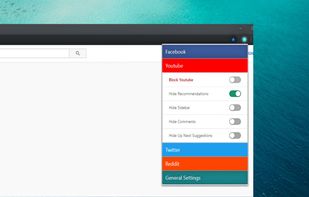
We have identified those parts in each of these websites that grab our attention and serve us unlimited content all day. This extension enables you to hide each of these parts selectively, and even block access to any of these websites.
Your settings are synced over the google account so that you can use this extension in multiple computers with the same settings.
All features (each of the below can be controlled individually):
• Facebook
? Block Facebook (blocks access to Facebook)
? Hide Feed (hides the main feed)
? Hide Likes and Comments (hides this section from ALL posts)
? Hide Chat Sidebar (hides the contact sidebar on the right pane)
• Youtube
? Block Youtube (blocks access to Youtube)
? Hide Recommendations (hides the main feed)
? Hide Sidebar (hides left sidebar)
? Hide Comments
? Hide Up Next Suggestions (will not suggest what to play next)
• Twitter
? Block Twitter (blocks access to Twitter)
? Hide Trends
? Hide Who to follow
? Hide all media (hides all images and videos)
• Reddit
? Block Reddit (blocks access to Reddit)
? Block r/popular (blocks access and hides links to r/popular)
? Block r/all (blocks access and hides links to r/all)
• General Settings
? Pause all filters (disables your filters temporarily, while keeping all your settings intact)
? Custom URL (the site where you wants to be redirected to if you open the blocked site. Currently defaulted to google)
? Hide tooltips







 sarojbelbase added UnDistracted as alternative to Undistracted Me

No comments or reviews, maybe you want to be first?