

TV Time Out icon
TV Time Out icon

TV Time Out

Export your complete TV Time library — shows, movies, lists — to JSON/CSV. 100% client-side, private, no account needed.
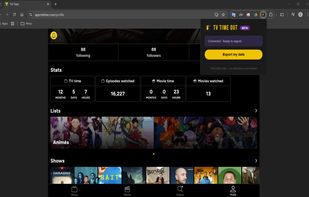
TV Time Out screenshot 1

Cost / License

  • Free
  • Proprietary

Platforms

  • Google Chrome
0likes
0comments
0articles

Features

Properties

  1.  Lightweight

Features

  1.  Dark Mode
  2.  No Tracking
  3.  Ad-free
  4.  No registration required
  5.  Export to CSV
  6. JSON icon  Export to JSON

TV Time Out News & Activities

Highlights All activities

Recent activities

TV Time Out information

  • Developed by

    FR flagThe Prism Labs
  • Licensing

    Proprietary and Free product.
  • Alternatives

    2 alternatives listed
  • Supported Languages

    • English

AlternativeTo Category

Web Browsers
TV Time Out was added to AlternativeTo by Paul on and this page was last updated .
No comments or reviews, maybe you want to be first?

What is TV Time Out?

Export your complete TV Time library — shows, movies, lists — to JSON/CSV. 100% client-side, private, no account needed.

TV Time Out by Refract lets you export your complete TV Time tracking data directly from your browser — no server, no account required. Fast, and works worldwide.

TV Time has no official export feature. TV Time Out by Refract fills that gap by replaying the same API calls your browser already makes, giving you full access to your own data.

WHAT GETS EXPORTED

  • All tracked series and anime with seasons, episodes, watch status, watched dates, and watch counts
  • Favorite series and movies
  • All tracked movies with watch status and watched date
  • Custom lists with all their series and movies
  • A visual HTML summary with sortable and filterable columns
  • A failed export log so nothing goes missing silently

FORMAT OPTIONS Choose before you export: JSON, CSV, or both. New in v1.2.4: optional ZIP bundle to download everything as a single file.

HOW IT WORKS

  1. Open app.tvtime.com and log in
  2. Click the TV Time Out by Refract extension icon
  3. Hit "Export my data"
  4. Your files are automatically saved to your device

PRIVACY 100% client-side — all processing happens locally in your browser. No data ever leaves your device. No account, no server, no tracking.

