





TrueClose
2 likes
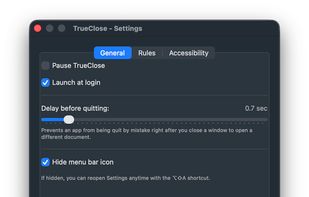
A macOS menu bar utility that auto-quits apps when they have no open windows left — closing the last window really closes the app, like on Windows.

Cost / License
- Free
- Open Source (MIT)
Since
- New
Releases
- 9 releases last year9 last year
GitHub
- GitHub stars: 24

Features
Highlights All activities
TrueClose News & Activities
Recent activities
- Robert L. liked TrueClose
- Robert L. commented on TrueClose
Don't forget to do xattr -d com.apple.quarantine /Applications/TrueClose.app after install to prevent Apple warnings.
- Kiebitz_XCIII liked TrueClose
- BunnyTD added TrueClose
- Paul updated TrueClose
 BunnyTD added TrueClose as alternative to MagicQuit, Red X Quit, MacQuit, Quitter and 5 more


Developed by
 Hoang Nhat Nam
Licensing
Open Source (MIT) and Free product.Written in
Alternatives
10 alternatives listedBadge
Get an embeddable badge for TrueCloseSupported Languages



Comments and Reviews
Don't forget to do xattr -d com.apple.quarantine /Applications/TrueClose.app after install to prevent Apple warnings.