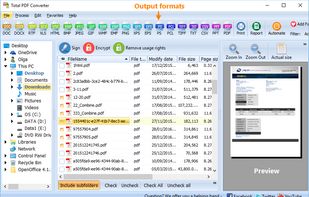
Total PDF Converter turns PDF files into DOC, RTF, TIFF, XLS, HTML, EPS, PS, TXT, CSV, PDF/A and images — one file or a whole folder at once. The interface is straightforward: add your files, choose a target format, set the options you need, and convert. Registered users also get command-line support for quiet, automated conversion on the back end.
Quick answer: To convert a PDF, install Total PDF Converter, add your files or a whole folder, pick the output format — DOC, DOCX, XLS, CSV, HTML, TIFF, JPEG, TXT, PS, EPS or PDF/A — set the options, then click Convert. It processes hundreds of PDFs in one batch on your own PC (no upload), keeps folder structure, runs OCR on scanned files, and works from the command line. Free 30-day trial.
- Download the full desktop version that does not require Internet connection or sharing your files online.
- Convert PDF files in batches, whole folders in one go.
- Turn scanned TIFF images into searchable PDFs with built-in OCR — in one pass, batch a whole folder and keep its structure.
- Add page numbers to your output files.
- Convert several PDF files into one Doc or DocX. More unique options..
Because it runs entirely on your own computer, your files are never uploaded or shared online — which matters for confidential legal, financial and medical documents. It converts a single file or thousands in one batch run.
Need a single quick conversion? Try the free online tools — no install, no signup: PDF to DOC, PDF to TIFF, PDF to TXT, PDF to XML, EPS to PDF, PS to PDF, PDF to RTF.
With support for over 25 different formats Total PDF Converter is neither complex nor difficult to use. If you need a server version without any GUI or interrupting messages check out the Total PDF Converter X with ActiveX. Buy your license today and convert PDF files with the full registered version in 5 minutes.






 CoolUtils Development
No comments or reviews, maybe you want to be first?