Toolkitta is a free, no-code workflow builder for everyday files that runs entirely in your browser. Files are processed on your own device with WebAssembly, WebCodecs and Web Workers. Nothing is uploaded and no account is needed.
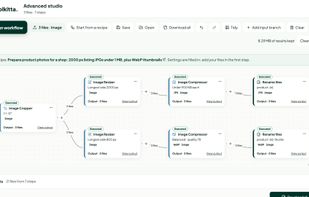
Advanced workflows: connect operations on a visual, node-based canvas and run them on a batch of up to 20 files at once. Branch the same files into several outputs, for example turning product photos into large listing images and small thumbnails in one run. Inspect every intermediate result, name the outputs from a pattern, download everything as a ZIP, save workflows for reuse or start from a ready-made recipe.
Step-by-step workflows: start with one file and add one operation at a time, for example crop, then compress, then turn it into a PDF. Each step shows its input, settings and output, and you can go back to any earlier step. Workflows can be saved and reopened.
Workflow steps cover images (compress, convert, resize, crop; HEIC, AVIF, WebP, PNG, JPG, TIFF), PDFs (merge, split, compress, protect, OCR), audio and video (trim, convert, compress, merge) and text, JSON and CSV. Each tool can also be used on its own.
Built-in editors for detailed work:
- Image Editor: text, shapes, drawings, images and signatures as editable layers, plus crop and blank canvases.
- PDF Editor: edit supported text and images, add text and signatures, fill forms and arrange pages.
- Video Editor: arrange clips, music and titles on a layered timeline and record a voiceover.
- Audio Editor: split, trim, fade and mix speech and music on a multitrack timeline.
Arrangements from the Video, Audio and PDF editors can be reused inside workflows.
Free, with no signup and no watermarks.







 Oem Mobile Studio

No comments or reviews, maybe you want to be first?