
tokenkarma icon
tokenkarma icon

tokenkarma

tokenkarma tracks AI usage limits, reset times and API spending from a desktop app for Windows and macOS. It is built for people who use several AI services and want to see their remaining capacity without repeatedly opening each provider dashboard.
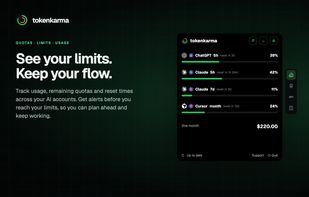
tokenkarma: track AI quotas, usage and reset times, with alerts before reaching your limits.

Cost / License

  • Freemium (Subscription)
  • Proprietary

Platforms

  • Mac  Browser-based tracking requires a supported browser to remain open.
  • Windows  Browser-based tracking requires a supported browser to remain open.
1like
0articles
Save

Features

  1.  Connect multiple accounts
  2.  Notifications
  3.  Real-time monitoring

tokenkarma News & Activities

Highlights All activities

Recent activities

tokenkarma information

AlternativeTo Category

Office & Productivity
tokenkarma was added to AlternativeTo by tokenkarma on and this page was last updated .

No comments or reviews, maybe you want to be first?

What is tokenkarma?

tokenkarma tracks AI usage limits, reset times and API spending from a desktop app for Windows and macOS. It is built for people who use several AI services and want to see their remaining capacity without repeatedly opening each provider dashboard.

Keep usage in view

  • See usage percentages and reset times for supported AI accounts.
  • Choose which limits the two configurable desktop rings display.
  • Receive alerts before reaching a limit and when capacity becomes available again, on supported paid plans.
  • Adjust alert thresholds and enable or disable sound and pulse alerts.

Track accounts and spending

  • Follow supported services such as Claude, ChatGPT, Gemini, Cursor, Grok and Perplexity. Available metrics vary by provider.
  • Keep personal and work accounts separate with multiple-account support on Expert.
  • Track connected API balances and spending on Expert.
  • Set extra-usage spending caps for Claude Code by session, day or week on Expert.

Desktop app and browser helper tokenkarma runs on Windows and macOS. Its browser helper collects supported usage counters from signed-in services and shows which accounts are being tracked. Browser-based collection requires a supported browser to remain open.

Plans Free tracks one source. Hobbyist tracks up to five sources and includes usage and reset alerts. Expert adds unlimited sources, multiple accounts, API cost tracking and Claude Code extra-usage controls. Paid plans are subscriptions, with monthly and annual billing. Check the official pricing page for current prices.

tokenkarma is an independent product and is not affiliated with the AI providers it supports.

