


To-Do DeskList
To-Do DeskList, free desktop to-do list software
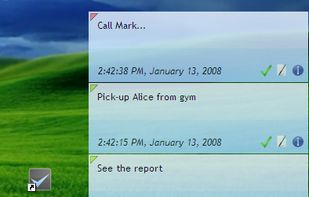
- Simple, nice looking and easy-to-use interface
- To-Do Notes placed directly on your desktop
- Assigning priority levels to to-dos
- All to-dos can have a reminder to a specific date and time
- Hotkeys fo.
Cost / License
- Free
- Proprietary
Application types
 EU
EUAlerts
- Discontinued
Platforms
- Windows
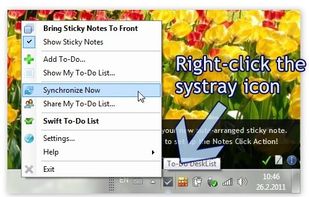
Most recent update (version 2.00) was released on Aug 23, 2013. See: http://www.dextronet.com/to-do-desklist

Features
- Sits in the System Tray
- Sticky Notes
To-Do DeskList News & Activities
Recent activities

To-Do DeskList information
Developed by
 Dextronet.com
 Licensing
Proprietary and Free product.Alternatives
121 alternatives listedSupported Languages
- English
AlternativeTo Category
Office & Productivity


What is To-Do DeskList?
To-Do DeskList, free desktop to-do list software
- Simple, nice looking and easy-to-use interface
- To-Do Notes placed directly on your desktop
- Assigning priority levels to to-dos
- All to-dos can have a reminder to a specific date and time
- Hotkeys for adding a new to-do and displaying all to-do notes in front of other windows
- Sorting To-Do Notes by priority or by date
- Well-arranged to-do list on your desktop instead of a complex structure
To-Do DeskList is a simple todo list software that is powerful in its simplicity and effectiveness.
Its development was inspired by real situations at work or home when new small to-dos or thoughts come to mind while working and it is not efficient to store them into a complex to-do list software. There are several ways how to handle them though - write them on paper, store them for example in notepad or forget them after a few seconds. Since non of these methods is too efficient To-Do DeskList was made to help with storing such tasks and thoughts into a well-arranged and well designed to-do list in a way as simple and fast as possible.
Comments and Reviews
To-Do DeskList is a very simple todo list: you can take your notes on your desktop and set reminders.
Once i used ReminderFox for my todos, but you must have Firefox open to see the notes.
To-Do DeskList instead is an handy system tray program and doesn't require an internet connection, so you can always use it.
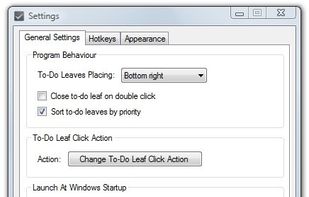
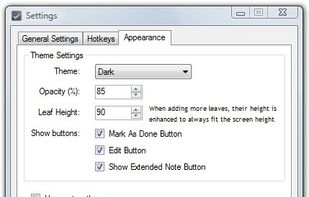
I am a college student and was looking for a good to-do list for my homework. Looking everywhere and trying everything, I finally came across this application, it is amazing! It uses very minimal resources, it's easy to use, customizable, and best of all free. You can choose which corner for it to be in, you can have it on the top right or left, or bottom right or left, you can change the theme, it's awesome!
I've tried several others, the only other one I saw that I liked was I Forgot The Milk, a Windows sidebar gadget, but that one requires internet, so if you don't have internet at some point, you can't see your tasks, so if for some reason your internet goes out (like the modem dies), then you can't see what tasks you had written. This one does not require internet, it works on any new windows OS, (I have windows 7 home premium 64-bit). I would highly recommend this program.