
Tipard M2TS Converter icon

Tipard M2TS Converter

 Like

Tipard M2TS Converter not only enables you to convert M2TS to HD MKV, HD H.264, HD AVI, HD TS, HD WMV, HD MPEG 4, HD MOV and other 1080p HD videos, but also can convert M2TS to general video formats like MP4, MKV, WMV, AVI, MOV, M4V and more.
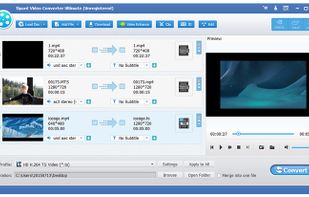
Tipard M2TS Converter screenshot 1

Cost / License

  • Freemium (Pay once or Subscription)
  • Proprietary

Since

  • Since 2019

Platforms

  • Windows
Alternatives
0likes
0alternatives
0articles
Save

Features

Features

Highlights All activities

Tipard M2TS Converter News & Activities

Recent activities

No activities found.

Tipard M2TS Converter information

  • Developed by

    HK flagTipard
  • Licensing

    Proprietary and Freemium product.
  • Pricing

    One time purchase that costs $36, and / or subscription that costs $12 per month + free version with limited functionality.
  • Alternatives

    0 alternatives listed
  • Badge

    Get an embeddable badge for Tipard M2TS Converter
  • Supported Languages

    • English

AlternativeTo Category

Video & Movies
Tipard M2TS Converter was added to AlternativeTo by Tipard Studio on and this page was last updated .

No comments or reviews, maybe you want to be first?

What is Tipard M2TS Converter?

Tipard M2TS Converter not only enables you to convert M2TS to HD MKV, HD H.264, HD AVI, HD TS, HD WMV, HD MPEG 4, HD MOV and other 1080p HD videos, but also can convert M2TS to general video formats like MP4, MKV, WMV, AVI, MOV, M4V and more. Meanwhile, it can also convert M2TS to common audio formats including MP3, FLAC, AAC and so on. Besides, you can edit your video by trimming, cropping, adding watermark to your video. Moreover, it supports English/French/German/Japanese four interface languages. Key Functions:

  1. Convert M2TS to MP4, MKV and more Tipard M2TS Converter is able to convert MTS/TS to 1080p HD videos like HD MKV, HD H.264, HD AVI, HD TS, HD WMV, HD MPEG 4, HD MOV and so on. Meanwhile, it can convert your video to MP4, MKV, WMV, AVI, MOV, M4V and other general video formats.

  2. Edit your video as you like Tipard M2TS Video Converter can help you to edit the video effect by adjusting the Brightness, Saturation, Contrast, Hue and Volume. Besides, you are able to trim any segment of the video, crop the video frame at your disposal, add text or watermark to the screen of the video, and adjust the position and transparency of the watermark.

  3. Merge several videos into one file and rename your video With Tipard M2TS Video Converter, you can merge several videos into one file, so that you can enjoy a long video in your digital devices. Meanwhile, in order to help you find your converted video, you can rename your video with a unique name. Thus, you never worry that you cannot find your converted video.

  4. High converting speed Tipard M2TS Video Converter also provides you with amazing converting speed by adopting NVIDIA® CUDA™ technology, AMD APP Acceleration and multi-core CPUs supporting technology. It can take full advantage of your PC power to accelerate the converting speed.