Simple and easy activity log keeper is here to help you and solve your many problems.
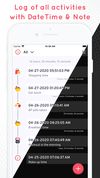
Keep a Track of your day to day activities in a very easy way.
Timestamp your Activities which can even help you in creating good habits.
How Timestamper: Keep Activity Log with Time and Note works?
• Install Timestamper: Keep Activity Log with Time and Note Application from Appstore.
• Add Your activity by simply clicking on “+”
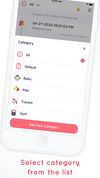
• Change and select category from the List
• Add new Category of activity
• Check your all activities by selecting “All” option
• You can check activities category wise also
• Edit options available for all fields
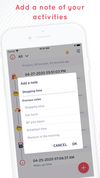
• Add a Note of your activities
• Change DateTime format as required
• On/Off toggle available to Set theme, Location,or to show miliseconds
• Select/active Dark mode when needed
• Record your Location
Interesting Features:
• Having category wise activity Log
• Add Date timestamp, Location, Note for Activities
• You can keep a record of the exact time any activity occurred and also can measure No.of times
• Available categories: All, Default, Baby, Book, Food, Gym, Home, Pill, Travel , Cap , Car , Flame , Flowers , Gift , Heart , Hospital, Map , Money , Movie, Music, Night , Pet , Phone , Pizza, Shopping Bag, Sport, Stop Watch, Train, Water, Weather
Why have Timestamper: Keep Activity Log with Time and Note Application in Your Smartphone
• To Improve Efficiency
• To Increase productivity
• Supports in enhancing activeness
• Give assistance for Routine Management
• To keep a track of Activities
• Helps in developing good habits
Most Efficient Application For Following Groups of People:
• All those who want to keep a record of newborn Baby during stages like Pregnancy, Labour and care until a baby turns Toddler.
• Keep a timestamp of Book reading, purchasing, sharing by adding a note related to it
• Keep a note of your daily food intake as well as diet plan. For example, 2 Bananas at 11 a.m., Daily dinner time track record etc.






 GREENCOM EBIZZINFOTECH LLP