Tier1Stretch is a Windows tool that applies stretched resolutions for competitive gaming in a single click. Setting up stretched resolution traditionally requires CRU (Custom Resolution Utility), a driver restart, and manual NVIDIA Control Panel configuration—with one wrong click resulting in black bars. Tier1Stretch eliminates this friction by creating custom resolutions and applying NVAPI full-panel GPU scaling automatically, filling your screen edge-to-edge with no bars and no manual intervention.
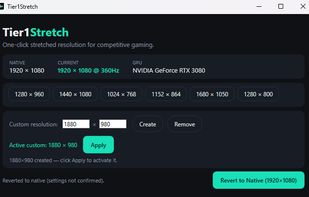
The application presents one-click tiles for popular competitive resolutions: 1440×1080 and 1280×960 (common 4:3 stretch targets), plus 1024×768, 1152×864, 1680×1050, and 1280×800. Clicking any tile applies the resolution and engages full-panel scaling instantly. A 15-second "Keep these settings?" countdown appears; simply confirm or wait for automatic revert if anything looks wrong. The current native resolution is always visible so you can instantly revert to it with one click.
For non-standard widths (e.g., 1750×1080, 1880×980), a built-in custom resolution creator allows typing exact dimensions, clicking Create, then Apply—no reboot, no extra software, anti-cheat safe.
Works best on NVIDIA GPUs where NVAPI scaling is automatic. AMD and Intel systems will switch resolutions correctly; full-panel scaling may require manual enabling in your GPU control panel. Requires Windows 10 or 11 (x64) and administrator elevation.
The core tool is free. An optional one-time Pro upgrade adds unlimited custom resolutions, per-game profiles that apply automatically, and multi-monitor support.
The tool is self-contained (~150 MB including .NET runtime), code-signed, and anti-cheat safe: no code injection, no game process access, just standard Windows display APIs.






No comments or reviews, maybe you want to be first?