
TextToSpeech.tools icon

TextToSpeech.tools

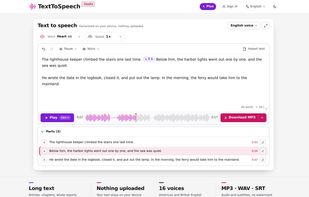
TextToSpeech.tools converts text into speech inside your browser. Your text is not uploaded to a server, and the free version needs no account.
TextToSpeech.tools screenshot 1

Cost / License

  • Free
  • Proprietary

Application type

Platforms

  • Online
0likes
0articles
Save

Features

Properties

Features

Highlights All activities

TextToSpeech.tools News & Activities

Recent activities

TextToSpeech.tools information

  • Developed by

    US flagWorks Tools
  • Licensing

    Proprietary and Free product.
  • Pricing

    Subscription.
  • Alternatives

    7 alternatives listed
  • Badge

    Get an embeddable badge for TextToSpeech.tools
  • Supported Languages

    • English
    • Chinese
    • Spanish
    • Portuguese
    • German
    • French
    • Russian
    • Japanese
TextToSpeech.tools was added to AlternativeTo by chenjindu on and this page was last updated .

No comments or reviews, maybe you want to be first?

Official Links

What is TextToSpeech.tools?

TextToSpeech.tools converts text into speech inside your browser. Your text is not uploaded to a server, and the free version needs no account.

Paste text, import a TXT, PDF or Word file, or type straight into the editor. Choose from 16 American and British English voices, or 100 Mandarin voices on the Chinese page. You can set the reading speed and insert pauses anywhere in the text. Playback starts after the first sentence is ready, while the rest is still being generated. Long text is split into parts. You can play, edit and regenerate each part on its own, so fixing one sentence does not redo the whole chapter.

Downloads are MP3 or WAV audio, plus SRT subtitles timed to the audio, with no watermark and no length limit. The voices download once on first use.

Plus adds several voices in one text (a narrator and characters, each with its own voice), projects saved to your account and sorted into folders, and no ads. The interface is available in nine languages.