Tessarium icon
Tessarium icon

Tessarium

Tessarium combines direct-on-canvas drawing with indexed tiles, providing an all in one solution for creating pixel art levels. Import Aseprite, PyxelEdit & Tiled files.
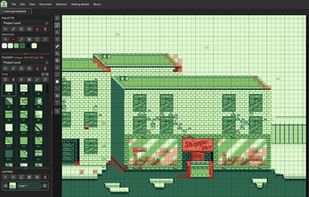
Heatmaps to help optimise tile usage per platform

Cost / License

  • Pay once
  • Proprietary

Platforms

  • Mac  *For the macOS app, you'll likely need to run in your terminal– xattr -cr /Applications/Tessarium.app
  • Windows
  • Linux
  • Online
0likes
0articles
Save

Features

Features

Highlights All activities

Tessarium News & Activities

Recent activities

Tessarium information

Popular alternatives

View all
Tessarium was added to AlternativeTo by Joel-Jarman on and this page was last updated .

No comments or reviews, maybe you want to be first?

What is Tessarium?

Tessarium combines direct-on-canvas drawing with indexed tiles, providing an all in one solution for creating pixel art levels. Import Aseprite, PyxelEdit & Tiled files.

  • Edit a tile once, and every instance updates across your level
  • Build reusable tilesets that can be shared between projects
  • Work quickly on the canvas and use built in tools to optimise your tile and colour usage
  • Platform based guidance tools. Highlight inefficient tile usage or exceeded colours per tile for your targeted console, or add your own custom specifications
  • Dynamic terrain building tools and prefab support to speed up level creation with your tile sets

Features

  • Tile-first workflow with linked tile editing (change once, update everywhere)
  • Shared tilesets and palettes – create, link, pull and update across levels built with shared tiles
  • Draw directly on canvas, then convert to tile(s) with CMD/CTRL + Click
  • Single or Multi-tile stamping, right click on a tile or drag to stamp duplicates of your selection on the canvas
  • Tile optimisation tools: Reidentify, Merge Duplicates, Remove Unused, and one-click Optimise
  • Tile usage heat-map to spot costly unique tiles and manage limits with tile counts
  • Colour guidance: Highlight any tiles that are exceeding the platforms colours per tile.
  • Terrain tools – Terrain Box, Terrain Line, Terrain Fill; set corner pieces, chain together tiles that need to sit next to each other, choose to have Tessarium shuffle your Terrain pieces for unique terrains.
  • Prefabs – Select a group of tiles, a tree, a house, a table etc, press + to save it as a project wide prefab. Import Prefab sheets to automatically add multiple at once.
  • Lighting – Shapes can be filled with solids, gradients, or special lighting fills which gives the effect of lit pixel art by moving up all the swatch colours to their next step up in luminosity, matched by hue.
  • Load a platform, GB, GBC, NES, SNES, SMS, SMD, C64 to load preset guidance for tile and colour limits, or create your own custom guidance.
  • Platform specific colour swatches
  • GB Studio font support & dimensions check – check a new canvas against level limits, both in dimensions and stopping non whole tile dimensions (causes GB Studio compile issues)
  • Precise tile edit mode – right click on a tile in your tile set to focus in and edit with the brush tool directly from the tileset (pinch/wheel to zoom in). Changes updated in real time in the canvas.
  • Mirror drawing
  • Outline and recolour artwork
  • Skew 3D pixel transforms for faux isometric 3D
  • Backups
  • Isometric guidelines and diamond shapes
  • Marquee selection with pixel-precise and tile-snapped modes (CMD/CTRL tile snaps)
  • Rulers, guides, and other essential editor tools
  • Layer support (visibility, opacity, blend modes, merge actions)

Import / Export

  • Import: PNG, Aseprite, PyxelEdit (.pyxel) and Tiled
  • Project format: .tsrium (includes tilesets and palettes)
  • Export: PNG (GB Studio default), JPG, WEBP, project JSON

Tessarium Videos
