




TabMerge
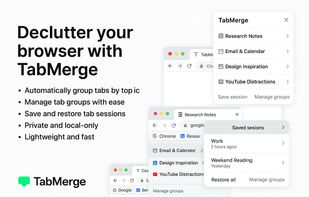
TabMerge is a smart, lightweight Chrome extension that automatically groups your open tabs by topic, lets you collapse and expand them with one click, and helps you save and restore sessions.

Cost / License
- Free
- Proprietary
Platforms
- Google Chrome


TabMerge
Features
Properties
- Lightweight
- Privacy focused
Features
- Dark Mode
- No registration required
- Extensible by Plugins/Extensions
- No Tracking
- Ad-free
- Tab Manager
TabMerge News & Activities
Recent activities
No activities found.
TabMerge information
What is TabMerge?
Auto-group tabs by topic. Collapse clutter. Breathe again.
TabMerge – Declutter Your Browser. Reclaim Your Focus. Your browser tabs are out of control. You know it. We know it. Let’s fix that, once and for all.
TabMerge is a smart, lightweight Chrome extension that automatically groups your open tabs by topic, lets you collapse and expand them with one click, and helps you save and restore sessions whenever you need to take a break or reboot your brain.
No more endless tab rows. No more “Where did I see that article?” No more overwhelm.
Why TabMerge? The modern web is noisy. You open a few tabs for research… then Slack messages. A Notion doc. Maybe Twitter. Then Gmail. Then five more news articles. Suddenly, your tab bar looks like a Wall Street stock ticker.
TabMerge is your mental reset button.
With a single click, it organizes chaos into clarity - and gives you back the focus you lost somewhere between tabs 12 and 58.
Features You’ll Love
- Automatic Tab Clustering TabMerge uses intelligent heuristics to detect the topics behind your tabs - whether it’s “AI Research,” “Gmail & Docs,” “Product Hunt Dives,” or “YouTube distractions.”. It then auto-groups similar tabs into smart clusters, which you can collapse, expand, or rename at will.
Example: Instead of 23 individual tabs, you see:
[+ AI Research (5 tabs)] [+ Email & Calendar (3 tabs)] [+ Design Inspiration (7 tabs)] [+ YouTube Distractions (4 tabs)]
You get context. You get control. You get calm. You get clarity.
- Save & Restore Sessions Close Chrome without fear. TabMerge lets you save your current workspace into named sessions that can be recalled any time.
Example Use Cases:
🛠 Save a “Work” session before switching to “Weekend Reading”
🎓 Save your research progress for tomorrow’s thesis
💻 Restore your entire dev setup with one click
TabMerge remembers where you left off - so your browser becomes your workspace, not a war zone.
- Rename, Collapse, and Pin Groups Give your tab clusters human-readable names. Collapse the ones you’re not using. Pin the ones you always want open (like Gmail or Notion).
TabMerge gives you the freedom to curate your mindspace.
- Anonymous. Private. Local-First. TabMerge never sends your data anywhere. It runs completely in your browser. We don’t track, sync, or harvest anything.
There’s no account required. No login. No analytics. No creepy permissions.
What happens in your tabs, stays in your tabs.