


Tab Notes
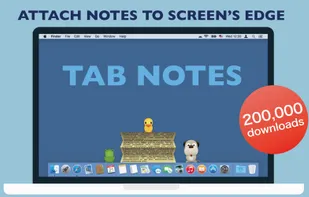
Tab Notes is a Menu Bar application which keeps your notes tidy and easy to access and your screen uncluttered. Click on your screen edge, then a note pops up!

Features
- Sticky Notes
Tab Notes News & Activities
Recent activities
 Maoholguin added Tab Notes as alternative to Flash Note


Tab Notes information
Developed by
 Catalystwo Limited
 Licensing
Proprietary and Commercial product.Pricing
One time purchase (perpetual license) ranging between $29 and $30.Alternatives
3 alternatives listedSupported Languages
- English
- Japanese
What is Tab Notes?
Thank you for using Tab Notes Lite. 200,000 users with average 4.7 star rating!
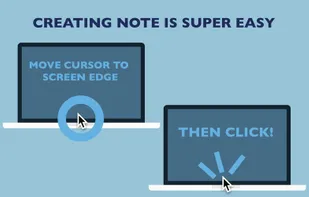
Tab Notes Lite is a Menu Bar application which keeps your notes tidy and easy to access and your screen uncluttered. Click on your screen edge, then a note pops up!
Watch the demonstration video here ? https://vimeo.com/62485482
• Click on your screen's edge to take a note. • Document file types are conventional RTF (Rich Text) and RTFD (Rich Text with images). Not proprietary format. (This application uses "Comment" property in RTF. ) • Documents folder can be any folder in your home folder. • Supports versioning. OSX keeps documents' previous versions. (This app does not contain version browser. Please use TextEdit to browse version files.) • The app has built-in short term backup system. Changes made to notes will be kept for 3 days in the backup folder (you can open it from the preferences). For more comprehensive backup system, we recommend other application. • Customisable with original themes created in Tab Notes Theme Editor: https://itunes.apple.com/us/app/tab-notes-theme-editor/id665702825?ls=1&mt=12
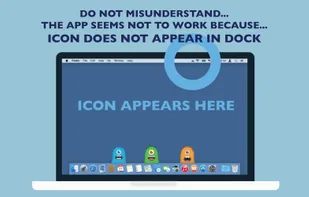
- This application is a "menu bar app". The application icon does not appear in "Dock". Instead it appears in main menu bar. You can change preferences from the icon in the main menu bar.
¦¦FAQ¦¦
Q. The application does not open. It does't work. A. This app is a menu bar app. App icon does not appear in Dock. It is designed to serve you discreetly without occupying Dock space. The application icon appears in the right part of the main menu bar at the top of the screen.
Q. Tab did not appear. Where can I add my notes? A. Just click the screen edge. Please see the video https://vimeo.com/62485482
Q. It would not let me delete the app. A. Finder does not let you delete an app that is currently running. Quit the app first. To quit the app, choose Quit from this application's menu in the main menu bar at the top of the screen. (Even though this app may be running, while in stand by, its CPU power usage is almost nothing.)
Q. Isn't there any "Preferences" for this app? A. Yes there are. The menu icon of this app is located in the right part of the main menu bar at the top of the screen. You can choose this app's Preferences here.
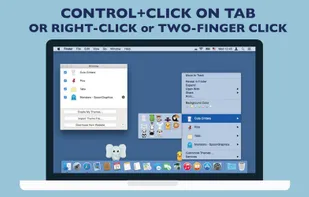
Q. How do I change themes or background colour? A. Press and hold Control key then click a tab. Contextual menu appears. (Depending on device configurations, right-click on mouse or two finger click on track pad may be used.)
