





Gone Surfing
Like
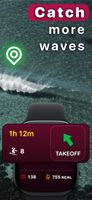
Apple Watch surf tracker that points you back to your takeoff zone, counts waves automatically and maps each rides. The iPhone app displays metrics and charts for waves, sessions and surf fitness.



+6


Cost / License
- Freemium (Subscription)
- Proprietary
Platforms
- iPhone
- Apple Watch

Features
Gone Surfing News & Activities
Highlights All activities
Recent activities
- reviewed Gone Surfing★★★★★
Most accurate wave tracker so far
- Darian added Gone Surfing
- Paul updated Gone Surfing
 Darian added Gone Surfing as alternative to SurfBuddy, Surf Athlete, Surfnerd, BuoyBoy and 6 more

Gone Surfing information
Developed by
 SwellSolutions
 Licensing
Proprietary and Freemium product.Pricing
Subscription ranging between $1 and $19 per month + free version with limited functionality.Alternatives
10 alternatives listedBadge
Get an embeddable badge for Gone SurfingSupported Languages


Comments and Reviews
Most accurate wave tracker so far