
Super Menu icon
Super Menu icon

Super Menu

 Like

Your files, folders, apps, links, and shortcuts in one menu.
Super Menu screenshot 1

Cost / License

  • Pay once
  • Proprietary

Application type

Since

  • New

Platforms

  • Mac
0likes
0articles
Save

Features

Properties

Features

Highlights All activities

Super Menu News & Activities

Recent activities

Super Menu information

AlternativeTo Category

OS & Utilities

Popular alternatives

View all
Super Menu was added to AlternativeTo by Paul on and this page was last updated .

No comments or reviews, maybe you want to be first?

Official Links

What is Super Menu?

Your files, folders, apps, links, and Shortcuts in one menu.

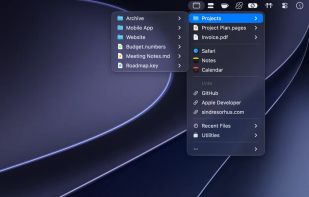
Super Menu gives you a fast, customizable menu in the menu bar. Add the things you use most, arrange them in any order, and organize them into inline sections or nested submenus.

Features:

  • Add files, folders, apps, websites, and Shortcuts
  • Browse folders and subfolders right in the menu
  • Open the menu with a keyboard shortcut, optionally at the pointer
  • Preview files with Quick Look without leaving the menu
  • Set the sorting, filtering, and item limit for each folder
  • Create smart folders that filter by name, extension, tag, date, or size
  • Show the results of Finder Saved Searches
  • Add Shortcuts folders that stay in sync with the Shortcuts app
  • Keep a private list of recent files and add any of them to the menu
  • Choose which app opens each file, folder, or website
  • Use Open With, Share, Copy File, and Copy Path on any file
  • Hold Option to show in Finder, copy a link, or edit a shortcut
  • Choose from a set of menu bar icons