SubWake icon
SubWake icon

SubWake

 Like

Many powered subwoofers switch to standby after some minutes without an input signal, and on many models this can't be turned off. When sound comes back, the sub takes a second or two to wake, so you lose the start of songs, videos and game sounds.
SubWake screenshot 1
SubWake screenshot 2
SubWake screenshot 3

Cost / License

  • Free
  • Open Source (MIT)

Since

  • New

Platforms

  • Windows
Alternatives
0likes
0alternatives
0articles
Save

Features

Features

Highlights All activities

SubWake News & Activities

Recent activities

  • Rumenito added SubWake

SubWake information

GitHub repository

  •  0 Stars
  •  0 Forks
  •  0 Open Issues
  •   Updated  
View on GitHub
SubWake was added to AlternativeTo by Rumenito on and this page was last updated .

No comments or reviews, maybe you want to be first?

Official Links

What is SubWake?

Many powered subwoofers switch to standby after some minutes without an input signal, and on many models this can't be turned off. When sound comes back, the sub takes a second or two to wake, so you lose the start of songs, videos and game sounds.

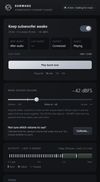
SubWake is a small Windows tray app that fixes this. Every few minutes, only while nothing else is playing, it plays a short, quiet low-frequency tone through the output that feeds your sub, which resets the sub's standby timer. While music or other audio plays, it stays silent.

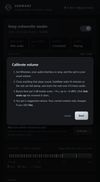
  • First-run setup: pick your output, your sub's standby time and a starting volume.
  • Calibration suggests the lowest level that still wakes your sub.
  • Holds while an app records, while chosen apps are open, and lets the sub sleep when you're away.
  • Free and open source (MIT), no account, no telemetry. The only network use is an optional update check.