Stream Manager is a free, open source Windows app for streamers and video creators who keep their recordings locally or on cloud-based storage. It started as a way to organize raw OBS recordings and grew into the foundation for an entire streaming workflow.
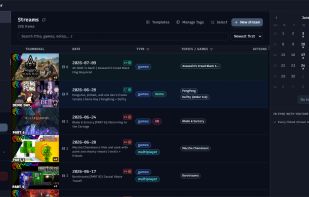
Everything is built around your local stream library. Point the app at the folder where your recordings live and it groups your videos, thumbnails, and related files into stream items you can search, tag, and edit. Each stream's details are stored next to its files, so your library stays portable even if you move it to another drive.
What it does:
Streams library: organize recordings with thumbnails, dates, games, tags, and comments, plus season and episode tracking for series.
YouTube and Twitch: push titles, descriptions, tags, and thumbnails to a linked broadcast or video without leaving the app. YouTube sync works both ways, so edits made in YouTube Studio can be pulled back, and existing channel videos can be imported as stream items.
Stream Relay: point OBS at Stream Manager instead of YouTube and it binds your scheduled broadcast, takes it live when you start, and ends it when you stop. It forwards your already-encoded stream, so there is no second encode. YouTube only for now.
Video player: review a session with a scrubbable timeline and per-track audio control for game, mic, and chat, then export clips with per-segment aspect ratios for vertical or square posts.
Thumbnail editor: a built-in canvas editor with your installed fonts, shapes, image filters, drop shadows, and layers. Save layouts as templates with merge fields that fill in the title, game, date, and episode number, and preview a design on real YouTube layouts before you publish it.
Converter: ffmpeg presets for upload or archiving, container remuxing such as MKV to MP4 without re-encoding, and a combine tool for streams that recorded as several separate files.
Auto-rules: watch a folder and automatically move, rename, or convert files as they arrive, so finished recordings sort themselves into your library.
Launcher: start OBS, chat tools, and anything else in your routine as a named group in one click.
Cloud and NAS aware: if your sync tool works through Windows File Explorer, Stream Manager detects which files are local and which are offloaded, and can pin or offload them in bulk to manage disk space.
Optional Claude AI integration can generate titles, descriptions, and tags using your own Anthropic API key.
Stream Manager runs on Windows 10 or later and ships as a single portable executable with no installer. It needs no account, and your recordings, settings, and API keys stay on your machine. Connecting YouTube currently requires your own Google Cloud OAuth credentials, with setup instructions in the app.







 chenjindu added Stream Manager as alternative to FreeCompress.video
 Mustafa Özel added Stream Manager as alternative to VidShrink
 DESANOA added Stream Manager as alternative to Poprica
 Jacob Zabrowki added Stream Manager as alternative to Video Squisher


 PJM Design


No comments or reviews, maybe you want to be first?