





Stillscript
1 like
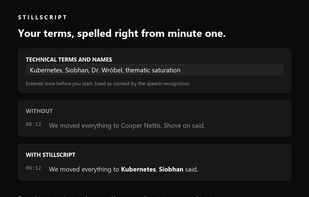
Stillscript transcribes interviews, lectures and meetings directly in your browser. Speech recognition runs on your own computer, so your recordings stay there and nothing is uploaded to a server. After a one-time model download it even works offline.

Cost / License
- Freemium (Pay once or Subscription)
- Proprietary
Application type
Platforms
- Online


Features
Highlights All activities
Stillscript News & Activities
Recent activities
 Stillscript added Stillscript as alternative to oTranscribe
- Stillscript liked Stillscript
 Stillscript added Stillscript as alternative to Otter.ai, Trint, HappyScribe, Descript and 4 more
- Stillscript updated Stillscript
- Stillscript added Stillscript
- Stillscript added Stillscript as alternative to Otter.ai, Trint, HappyScribe, Descript and 4 more


Developed by
StillscriptLicensing
Proprietary and Freemium product.Pricing
One time purchase that costs $24, and / or subscription that costs $9 per month + free version with limited functionality.Alternatives
9 alternatives listedBadge
Get an embeddable badge for StillscriptSupported Languages


No comments or reviews, maybe you want to be first?