


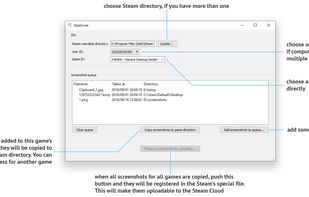

SteaScree
Features
- Multiple Account support
- Upload Screenshot
- Cloud Sync
- QT Based
- Auto resize
Tags
- Steam
- steamcloud
SteaScree News & Activities
Recent News
Recent activities
SteaScree information
Developed by
awthwathjeLicensing
Open Source (GPL-3.0) and Free product.Written in
Alternatives
0 alternatives listedSupported Languages
- English

What is SteaScree?
SteaScree is a simple cross-platform open-source utility tool, which greatly simplifies the uploading of screenshots to the  Steam Cloud, which were taken without the use of Steam's in-game overlay. You just pick pics, select game and SteaScree will do the rest.
Every Steam user has 20 GB of cloud space specifically for a screenshot storing. But not every screenshot can be easily uploaded to the Steam Cloud, since the files should have been created by Steam in-game overlay, thus have a specific filename, reside in specific Steam directories and be registered within a special screenshots.vdf file. Steam fails to upload custom screenshots returning "Steam Cloud may be temporarily unavailable" error. SteaScree resolves this and automates the whole screenshot uploading preparation process.
SteaScree features: — Able to copy screenshots for different games before preparing them all for uploading — Fetches game titles from Steam's public internet API — Properly handles creation date — May auto-resize huge screenshots, which exceed Steam Cloud limits — Supports multiple user accounts — Automatically converts PNG, BMP, TIFF screenshots to JPEG — Supports multiple Steam installations — Supports even non-Steam games — Cross-platform and open-source