Stagger icon
Stagger icon

Stagger

Stagger extends Tableau Cloud's scheduler: seasonal windows, custom cadences, batch rescheduling across the site, and a record of every action it takes.

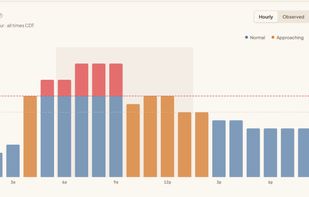
Hourly view of extract schedule. Instantly see which hours breach the concurrent-refresh limit (red) versus stay safe (blue).

Cost / License

  • Subscription
  • Proprietary

Platforms

  • Online
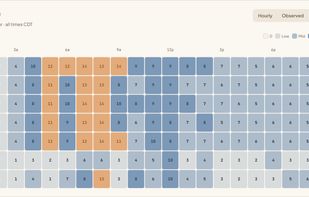
Every extract refresh on one weekly heatmap. Orange cells mark the hours running over your concurrent-refresh limit.
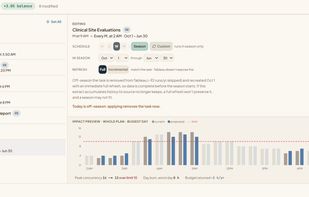
Give an extract refresh an annual season staged right from the schedule editor. Off-season, Stagger removes the task entirely. At season start it recreates the task with one immediate full refresh, so data is complete from day one.
+2
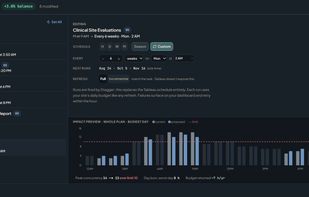
Set an interval the native scheduler doesn't offer, like every 6 weeks or every 10 days. Stagger fires each run on the policy calendar and records every one, so the schedule history checks out against Tableau itself.
0likes
0comments
0alternatives
0articles

Features

  1.  Data-management

Stagger News & Activities

Highlights All activities

Recent activities

  • Stagger added Stagger

Stagger information

  • Developed by

    US flagStagger
  • Licensing

    Proprietary and Commercial product.
  • Pricing

    Subscription ranging between $41 and $59 per month.
  • Alternatives

    0 alternatives listed
  • Supported Languages

    • English
Stagger was added to AlternativeTo by Daniel on and this page was last updated .
No comments or reviews, maybe you want to be first?

What is Stagger?

Stagger is a scheduling extension and management layer for Tableau Cloud extract refreshes. Tableau Cloud's scheduler stops at hourly, daily, weekly, and monthly: it has no seasonal schedule type and no every-N-weeks cadence. Stagger adds both, and manages the whole refresh calendar they live in.

Extend: give a task a season ("daily, Oct 1 through Jan 15") and Stagger removes it off-season (zero runs, zero budget) and recreates it at season start with one full refresh, so data is complete from day one. Or give it a cadence Tableau has no word for (every 6 weeks, every 10 days) and Stagger fires each run on the policy calendar.

Balance: every schedule on the site in one view, clustering and conflicts visible, batch reschedules with the impact previewed before you apply.

Watch: Stagger models your site's daily runtime budget from real run durations, keeps a record of every action it takes, and when a task changes outside Stagger it stops and tells you rather than guessing.

It connects through a Connected App, read-only by default, and changes nothing about your data pipelines; the only writes are the schedules and policies you stage yourself.

Official Links