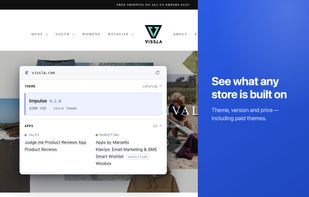
Stackpeek is a browser extension for Chrome and Firefox that identifies the technology behind any Shopify storefront. Open a store, click the toolbar icon, and a side panel reports the theme, the apps, the tracking pixels, the product catalogue and the current best sellers in about a second — without leaving the tab.
What it reports:
• Theme — name, version, creator and price, including paid themes. It also distinguishes a stock theme from a customized fork, a bespoke build, or a headless storefront with no readable theme at all.
• Apps — every app it can fingerprint, grouped by what it does: page builders, email, reviews, upsell, subscriptions, loyalty, shipping and more.
• Trackers and tech stack — the advertising and analytics pixels the storefront loads, each named individually rather than counted as a total, alongside its CDN, payment, consent and search services.
• Products — catalogue size, price range and variant count.
• Best sellers — the store's real top products, in the merchant's own order. Stackpeek does not model revenue or infer what is selling; where the order can't be verified, it shows nothing rather than a guess.
• Product CSV export — every public product and variant, up to 10,000 products, in Shopify's own product-import format: titles, descriptions, prices, compare-at prices, SKUs, weights, options, tags and image URLs. The catalogue is assembled in your browser and never sent to Stackpeek.
• Findings export — copy a scan as Markdown, or save it as CSV or JSON.
Every call is checkable. Weak app matches are marked "unverified" rather than quietly dropped, unknown hosts and trackers are counted so the gaps stay visible, and a site that isn't Shopify is reported as not Shopify.
Free to use, with no account, sign-up or email. The extension's source is published in full under the MIT licence at https://github.com/tonic20/stackpeek-extension, so what it reads and what it sends can be checked rather than taken on trust.
Privacy: Stackpeek doesn't collect your browsing history. It reads technical signals from the page you're on and sends them for matching against a server-side fingerprint catalogue; nothing is kept about pages that aren't Shopify stores, and for stores the record attaches to the store, not to you. Four permissions on Chrome (activeTab, scripting, sidePanel, storage) and three on Firefox, which needs no permission for its sidebar.






 Anton Kopylov added Stackpeek as alternative to Koala Inspector, PPSPY and DropshipHunt


No comments or reviews, maybe you want to be first?