





Stackboard
Like
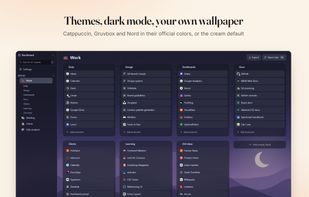
Free Chrome new tab page that organizes your bookmarks into spaces and stacks. Everything is stored as regular Chrome bookmarks, so it syncs and works offline.

Cost / License
- Free
- Open Source (MIT)
Platforms
- Google Chrome
- Brave
- Chromium


Features
Highlights All activities
Stackboard News & Activities
Recent activities
- stackboard added Stackboard
 stackboard added Stackboard as alternative to OneTab, Toby For Tabs, start.me, Momentum and 1 more

Developed by
StackboardLicensing
Open Source (MIT) and Free product.Written in
Alternatives
5 alternatives listedBadge
Get an embeddable badge for StackboardSupported Languages

AlternativeTo Categories
Web Browsers, Backup & Sync, OS & UtilitiesGitHub repository
- 2 Stars
- 0 Forks
- 0 Open Issues
- Updated


No comments or reviews, maybe you want to be first?