SQL Backup icon
SQL Backup icon

SQL Backup

A native Windows desktop application that automates encrypted database backups for MySQL, MariaDB, PostgreSQL, and MSSQL to local drives or network NAS.
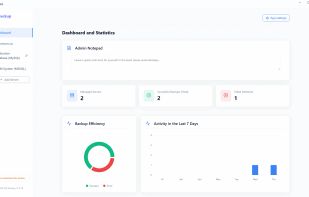
General overview of your backup operations and success rates.

Cost / License

  • Freemium (Pay once)
  • Proprietary

Platforms

  • Windows  Available for Windows x64 (10, 11, Server 2016+). No additional libraries required.
0likes
0articles
Save

Features

SQL Backup News & Activities

Highlights All activities

Recent activities

SQL Backup information

  • Developed by

    PL flagProject Backup
  • Licensing

    Proprietary and Freemium product.
  • Pricing

    One time purchase (perpetual license) ranging between $29 and $79 + free version with limited functionality.
  • Alternatives

    2 alternatives listed
  • Badge

    Get an embeddable badge for SQL Backup
  • Supported Languages

    • English
    • Polish

AlternativeTo Category

Development
SQL Backup was added to AlternativeTo by Jakub Polrolniczak on and this page was last updated .

No comments or reviews, maybe you want to be first?

Official Links

What is SQL Backup?

Project Backup - SQL Backup is a dedicated on-premise Windows desktop utility engineered to automate database archiving for MySQL, MariaDB, PostgreSQL, and Microsoft SQL Server (MSSQL).

The application runs locally on Windows (including Windows Server 2016+) and creates compressed, encrypted ZIP archives of database dumps without routing sensitive corporate data through external cloud servers.

Key Features:

  • Multi-Engine Support: Handles scheduled and manual dumps for MySQL, MariaDB, PostgreSQL, and MSSQL.
  • Non-Blocking Dumps: Uses native backup commands that perform "in-flight" dumps without locking tables, keeping ERP systems, accounting software, and live web apps fully operational during backup windows.
  • 100% On-Premise & Zero-Cloud: No external web dashboards or telemetry. Access credentials and database dumps remain confined to the local network and encrypted.
  • Storage Destinations: Archives dumps directly to local drives, external USB media, or network-attached storage (NAS via SMB).
  • One-Click Restore: Automated extraction and database rebuilding directly from ZIP archives.
  • Automated Retention: Configurable cleanup rules that automatically delete obsolete archives after a successful new backup.
  • Email Notifications: Integrated SMTP reporting for success and error logs.

