Spud icon
Spud icon

Spud

Spud solves the problem of wanting to play games on a computer attached your TV, from a laptop on your couch. It's a cross-platform remote control application that sends local input to a remote server, and is optimised for gaming.
Spud screenshot 1

Cost / License

Platforms

  • Mac
  • Windows
  • Linux
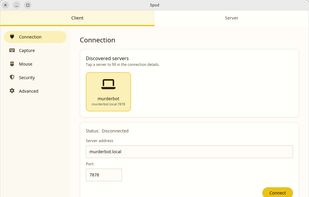
Spud screenshot 1
1like
0comments
0alternatives
0articles

Features

Properties

  1.  Gaming-focused

Features

  1.  Support for Remote Control
  2.  Low Latency

Spud News & Activities

Highlights All activities

Recent activities

  • niksavc liked Spud
  • POX added Spud

Spud information

  • Developed by

    FI flagfoax
  • Licensing

    Open Source (GPL-3.0) and Free product.
  • Written in

  • Alternatives

    0 alternatives listed
  • Supported Languages

    • English

AlternativeTo Categories

Gaming SoftwareOS & Utilities

GitHub repository

  •  9 Stars
  •  0 Forks
  •  0 Open Issues
  •   Updated  
View on GitHub
Spud was added to AlternativeTo by Paul on and this page was last updated .
No comments or reviews, maybe you want to be first?

What is Spud?

Spud solves the problem of wanting to play games on a computer attached your TV, from a laptop on your couch. It's a cross-platform remote control application that sends local input to a remote server, and is optimised for gaming. Input is as responsive as possible, and protocol parameters are tunable for latency and reliability. As it's intended to be used in a situation where you can already see the output from the server on another device, it doesn't accept video or sound output from the server.

Why use Spud?

So you got yourself a wee gaming rig for your TV, but you don't have a controller or you prefer keyboard/mouse. Spud's got you: run the server on your gaming machine, and the client on your laptop, and voilà! You can now game on your big TV and impressive sound system from the comfort of your couch, without wires!

Spud is optimised for gaming, and is easy to set up. It's also open-source, so if something is broken or there's a feature you'd like to implement, you're very welcome to contribute.

Features:

  • Simple UI
  • Cross-platform
  • Low latency input streaming
  • Input capture toggling by hotkey
  • Relative or absolute pointer movement
  • LAN discovery
  • Optional local screen blanking on input capture
  • Tolerance of poor network conditions
  • Optional password protection and encryption
  • Tunable performance and reliability settings

Official Links