
Calculon Notepad icon

Calculon Notepad

 Like

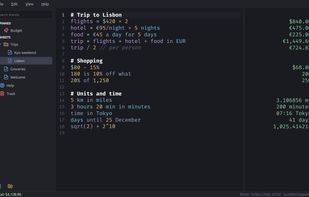
Calculon is a free, open-source notepad calculator. You type a line like $19 for breakfast + $22 for the uber, and the answer shows up in a column next to it. Words around the numbers are fine, so a sheet reads like a normal note.
Calculon Notepad screenshot 1

Cost / License

  • Free
  • Open Source (MIT)

Since

  • New

Updated

  • Updated Nov 2026

Platforms

  • Windows
  • Mac
  • Linux
0likes
0articles
Save

Features

Properties

Features

Highlights All activities

Calculon Notepad News & Activities

Recent activities

Calculon Notepad information

AlternativeTo Category

Business & Commerce

GitHub repository

  •  3 Stars
  •  2 Forks
  •  0 Open Issues
  •   Updated  
View on GitHub
Calculon Notepad was added to AlternativeTo by sprytnyk on and this page was last updated .

No comments or reviews, maybe you want to be first?

Official Links

What is Calculon Notepad?

Calculon is a free, open-source notepad calculator. You type a line like $19 for breakfast + $22 for the uber, and the answer shows up in a column next to it. Words around the numbers are fine, so a sheet reads like a normal note.

It uses Soulver's syntax, so most Soulver sheets give the same answers in Calculon. Soulver only runs on Apple devices. Calculon also runs on Linux and Windows.

What you can write:

  • Percentages, unit conversions and dates, such as 20% off $80, 10 km in miles and today + 3 weeks
  • About 160 currencies. The rates update once a day, and Calculon keeps the last ones so they work offline.
  • Variables, totals of the lines above, and named subtotals with housing =
  • Trip plans with @from and @to, which show the date each stay or leg ends on

Each sheet is a plain .txt file in a folder you pick, so sync tools, grep and backups work on it. The only network requests Calculon makes are for exchange rates, and you can point it at your own rates server.

The interface and sheets work in English and Ukrainian, and spell check covers both. The Help sheet (F1) shows every feature with examples you can edit.

MIT licence. Builds are available for Linux x64, Windows x64, and macOS on Intel and Apple Silicon.