
SplitForUs icon
SplitForUs icon

SplitForUs

Split shared expenses on Windows, with approval voting on expenses (Premium) and an inactive mode for members who are away.
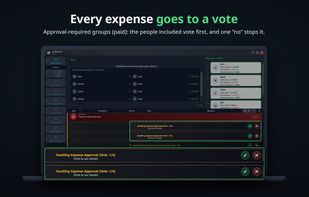
Every expense goes to a vote

Cost / License

  • Freemium (Pay once or Subscription)
  • Proprietary

Platforms

  • Windows
1like
0articles
Save

Features

Features

Highlights All activities

SplitForUs News & Activities

Recent activities

SplitForUs information

  • Developed by

    TR flagSplitForUs
  • Licensing

    Proprietary and Freemium product.
  • Pricing

    One time purchase ranging between $7 and $10, and / or subscription that costs $2 per month + free version with limited functionality.
  • Alternatives

    51 alternatives listed
  • Badge

    Get an embeddable badge for SplitForUs
  • Supported Languages

    • English
    • Turkish
    • Kurdish
    • German
    • French
    • Spanish
    • Portuguese
    • Arabic
    • Japanese
    • Hindi

AlternativeTo Category

Business & Commerce
SplitForUs was added to AlternativeTo by Taha Kayatürk on and this page was last updated .

No comments or reviews, maybe you want to be first?

Official Links

What is SplitForUs?

SplitForUs is a Windows desktop app for groups that share costs: roommates, small offices, trips and long-running shared budgets. Two features set it apart:

Approval-Required Groups (Premium): before an expense is added, the people included in it vote on it. A single "no" stops it, and the history shows who was included in what.

Inactive mode: away for a while? Go inactive and step out of new expenses until you're back. Only you can turn it on or off.

Every entry belongs to the person who added it, so nobody can add an expense in your name, and everyone sees who owes whom at a glance.

Also included: equal or proportional splits, 80 currencies with automatic conversion, recurring expenses for rent and bills, Excel and PDF reports, and Split & Close to settle up with as few transfers as possible.

The free plan has no time limit. Premium raises the expense limit and adds approval-required group slots; permanent group slots can also be bought once.; Premium adds approval-required groups and a higher expense limit. Available in 12 languages. Windows 10 and 11 only for now. Requires an internet connection and an email-verified account.
